
Samsung Rolls Out LockStar 7.0.01.10 Update With Key Bug Fixes
SammyGuru is reader-supported. We have affiliate and sponsored partnerships, so we may earn a commission when you buy through links on our site — at no extra cost to you. Learn more.
Samsung has released a new update for its LockStar Good Lock module, the second of the month. The latest release, version 7.0.01.10, focuses on stability improvements and bug fixes, including a notification issue on tablets. The update should be available widely over the next few days.
LockStar 7.0.01.10 update brings two key fixes to Galaxy devices
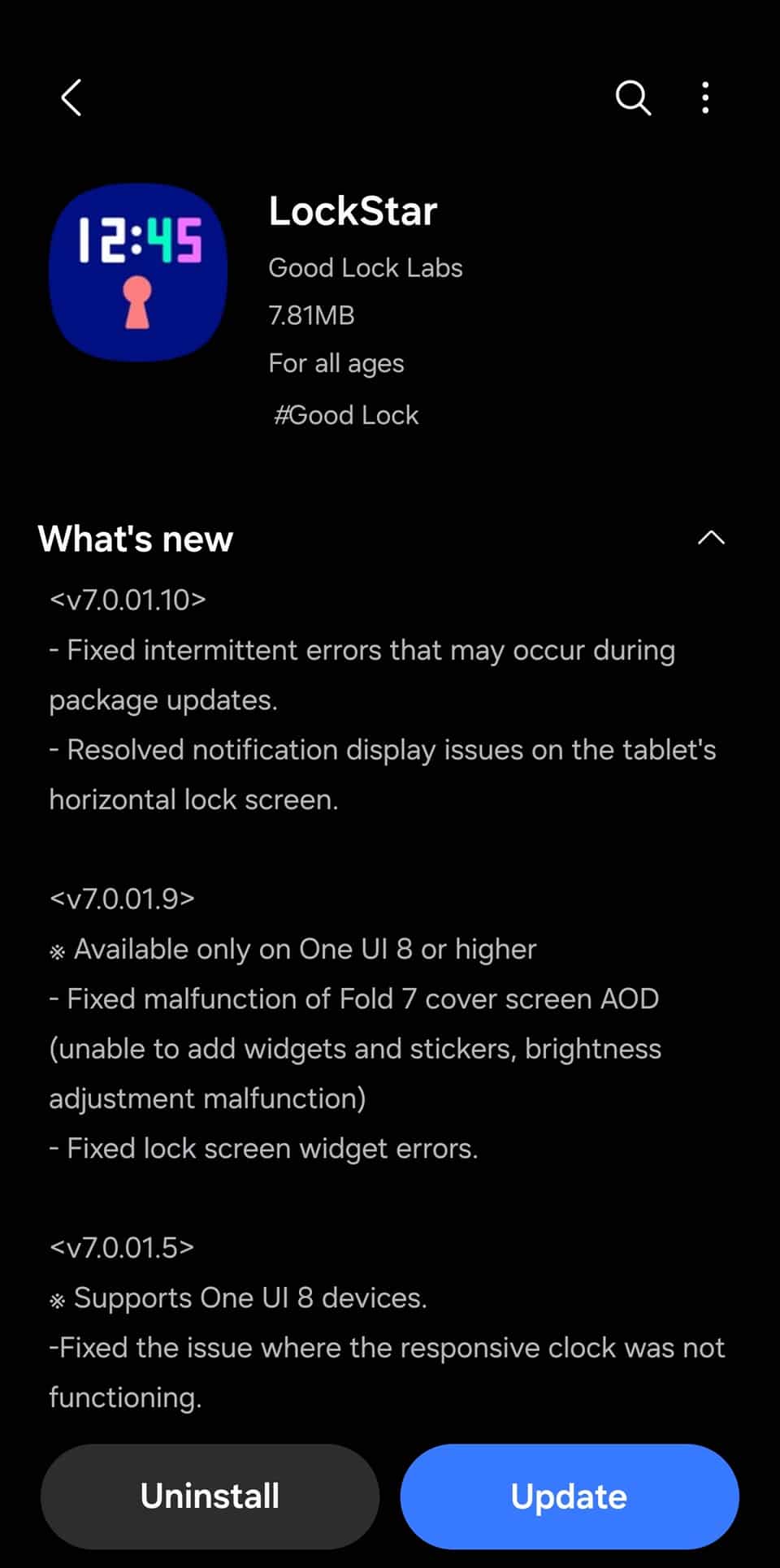
According to the official release notes provided via the Galaxy Store, the latest LockStar update addresses a bug that led users to random errors while updating packages on their devices. This bug could interfere with normal operation, but Samsung has now resolved it, ensuring smooth fuctioning of the app.
Another fix targets lock screen notifications on tablets in landscape mode. Previously, certain alerts didn’t appear properly when the device was held sideways, making it difficult for users to view incoming messages. With the new update, notifications should now show up as intended regardless of orientation.
As mentioned above, this is the second LockStar update Samsung has pushed this month. The previous release, which followed the One UI 8 update in July, also addressed a couple of major bugs, including an AOD issue on the Galaxy Z Fold 7. The latest update now further enhances the Good Lock module’s stability and reliability.
Part of the Good Lock suite, LockStar is used to personalize the lock screen on Galaxy devices with custom layouts, clock styles, and shortcuts. It gives Galaxy users more control over what their lockscreen looks like. By improving reliability, Samsung ensures the app continues to enhance the customization experience without glitches.
The new LockStar update is already live for Galaxy devices running the latest software (one UI 8). You can install version 7.0.01.10 by heading to the Galaxy Store > Menu > Updates. Alternatively, you can directly in the Good Lock app or open this link on your Galaxy device to go to the Galaxy Store.

Written by
Sumit AdhikariSumit, a life-long Samsung user, is passionate about technology and has been professionally writing on tech since 2017. He’s a mathematics graduate by education and enjoys teaching basic mathematics tricks to school kids in his spare time. Sumit believes in artificial intelligence and dreams of a fully open, intelligent and connected world.

Follow us on Google Discover & set us as a preferred source in Google News
Share this Post
___________________________


New Blog Posts
___________________________

First Set of Pixel 11 Pro XL Renders Are Here
Pixel 11 Pro XL CAD renders show minimal design changes

Is Samsung Preparing One UI 8.5 Beta for Galaxy Z Fold 5 and Flip 5?
Samsung may launch a One UI 8.5 beta program for its 2023 foldables

Galaxy S25 One UI 8.5 Beta May Run Longer Than Expected
Galaxy S25 series’ One UI 8.5 beta may stretch to 10 rounds







