
Google’s Changing Sideloading Rules, and the UI Too
SammyGuru is reader-supported. We have affiliate and sponsored partnerships, so we may earn a commission when you buy through links on our site — at no extra cost to you. Learn more.
Google is not only changing the way Android users sideload apps, but also giving the installation interface a visual makeover. The latest Android 16 QPR2 brings a Material 3 Expressive redesign to the Package Installer, responsible for apps installed from outside the Google Play Store. The redesign makes the interface look modern while helping users follow the installation steps easily.
Google revamps Android’s sideloading process with Material 3 design
Starting in September next year, Google will implement a stricter rule for app developers (even those who don’t publish on the Play Store). They will need to verify their identity through the Android Developer Console. Otherwise, the system will prevent users from sideloading their unverified apps.
This helps make sure that real people or companies are behind the apps, reducing the risk of malware and scams. For experienced users, Google is also introducing a new advanced flow that allows them to install unverified apps while clearly accepting the risks.
Now with Android 16 QPR2, Google has redesigned the Package Installer screen (via Android Authority) to make the installation process user-friendly. Previously, the app’s name and icon showed up at the top of the dialog. In the new design, they are centered, while the top location now displays ongoing actions such as “Install this app?”, “Installing…”, “App installed.” This change helps users understand exactly what is happening at each step.
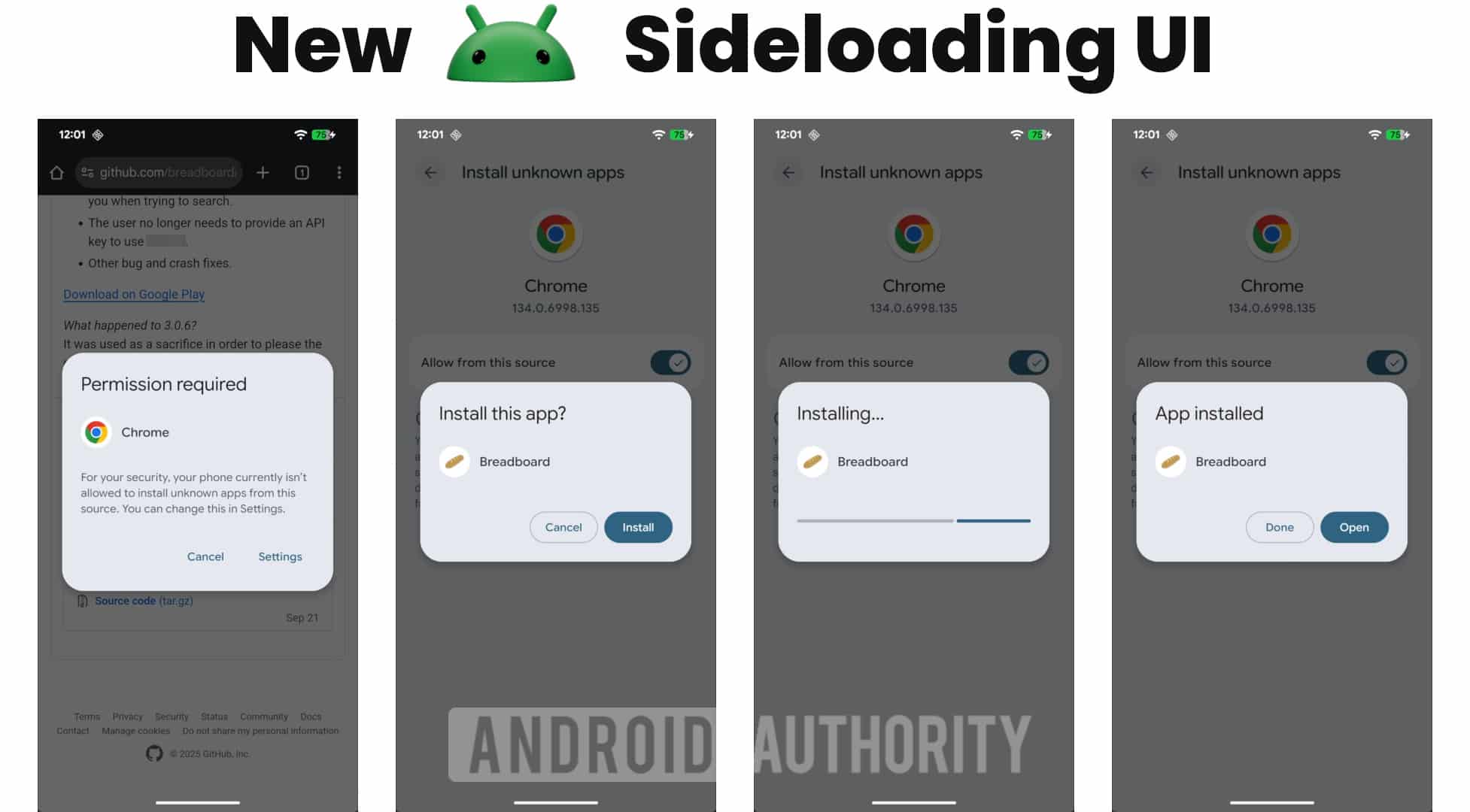
There are changes in the buttons as well, aligning with Material 3 button styles. Primary actions like “Install” and “Open” now use Filled Buttons, while secondary actions like “Cancel” and “Done” use Elevated Buttons. This makes it easier to differentiate main actions from secondary ones. The progress bar now follows the design of the Material 3 Linear Progress Indicator. Moreover, the title font has become slightly larger, giving the dialog a cleaner look.
However, the permission dialog that asks users to allow sideloading still uses the older button design. Note that Package Installer is part of the core operating system, so you will need a full OS update (i.e, Android 16 QPR2) to get the revamped app installation process. Galaxy user might receive this change with One UI 8.5 or One UI 9.

Written by
Binay KonwarBinay Konwar started his blogging journey in 2014 and has since written plenty of tech articles. At present, he is working as a News Writer at SammyGuru, covering everything about Samsung. He holds a Master's degree in Mathematics, but his real passion lies in tech and writing. In his free time, he enjoys playing chess and watching movies.

Follow us on Google Discover & set us as a preferred source in Google News
Share this Post
___________________________


New Blog Posts
___________________________

First Set of Pixel 11 Pro XL Renders Are Here
Pixel 11 Pro XL CAD renders show minimal design changes

Is Samsung Preparing One UI 8.5 Beta for Galaxy Z Fold 5 and Flip 5?
Samsung may launch a One UI 8.5 beta program for its 2023 foldables

Galaxy S25 One UI 8.5 Beta May Run Longer Than Expected
Galaxy S25 series’ One UI 8.5 beta may stretch to 10 rounds







