
Samsung Announces One UI 8 with Smarter Galaxy AI, Multimodal Intelligence
SammyGuru is reader-supported. We have affiliate and sponsored partnerships, so we may earn a commission when you buy through links on our site — at no extra cost to you. Learn more.
Samsung today launched the beta version of One UI 8, the next major update to its software experience. Based on Android 16, this update brings a smarter, more personalized Galaxy AI, expanding and refining the intelligent features first introduced in the Galaxy S25 series. The company aims to make everyday life more efficient and intuitive. In Samsung’s terms, One UI 8 isn’t just about new features — it represents a complete rethinking of how Galaxy devices interact with users across various form factors.
One UI 8 introduces a new era of Galaxy AI that is smarter and more contextual
At the heart of One UI 8’s innovation is its AI experience, which becomes more intelligent, context-aware, and helpful. Samsung outlines three core pillars driving this transformation, with the first being multimodal capabilities. This update introduces intelligent multimodality, allowing users to engage with AI in a more natural and seamless way. This means your device can understand what you’re looking at, watching, or doing in the moment.
Whether you are reading a recipe, watching a tutorial, or composing an email, your device offers assistance based on visual, contextual, and audio cues without requiring manual input or switching between apps. One UI 8 “initiates a new rhythm for Samsung’s software evolution with major UX and AI updates,” Samsung said.
You might have already guessed it, but the second pillar is a UX tailored to every form factor. Recognizing that users interact with smartphones, tablets, foldables, and wearables differently, Samsung has reworked the user experience across devices. Whether you’re using a Galaxy Fold, a Galaxy Watch, or a Galaxy Tab, One UI 8 adjusts layouts, interaction models, and tools to suit each screen type and usage scenario. This means more efficiency and productivity, no matter which device you’re using.
Finally, One UI 8 focuses on personalized, proactive suggestions so users can focus on what matters the most. Leveraging contextual AI, it will deliver customized suggestions based on your habits, location, time of day, and calendar events. Features like Now Bar and Now Brief will provide real-time updates, smart suggestions, and relevant information tailored to your daily routine, helping you stay on top of tasks and reducing the need to search or dig through menus.
The new era of Galaxy AI doesn’t compromise privacy
Samsung has emphasized that these powerful AI features are underpinned by industry-leading security and transparency. The entire AI experience in One UI 8 is made possible by Samsung Knox vault and on-device processing options. Knox Vault creates a secure environment combining a dedicated processor and secure memory. It keeps sensitive data completely isolated from the rest of the system, ensuring it cannot be accessed physically or remotely.
Additionally, many of Galaxy AI’s features support on-device data processing. Users can choose whether data is processed locally or via cloud-based services, giving them full control over their privacy settings. This approach reflects Samsung’s ongoing commitment to user choice, transparency, and data protection, ensuring that personalization does not come at the cost of privacy.
According to Samsung, One UI 8 kicks off the future of Galaxy AI. The company is positioning it as more than just a software update — it’s a new chapter in the Galaxy experience. From powerful AI integration to everyday convenience and top-tier privacy, it redefines how users interact with their devices across all form factors.
It’s not just about AI
Besides AI upgrades, One UI 8 includes several new tools and features designed to make daily tasks faster and more intuitive. With support for Auracast, a Bluetooth LE Audio-based technology, users can broadcast audio and share it with multiple devices, such as Galaxy Buds3, hearing aids, or other Auracast-compatible gear, by simply scanning a QR code. No need for complex pairing or manual settings; audio streaming is now as easy as point, scan, and listen.
Samsung is improving customer support as well. At repair centers, users can now check in and register their devices using QR codes or NFC, eliminating the need for physical forms and cutting down wait times. This feature is available through Samsung Account, making the support experience smoother and quicker.
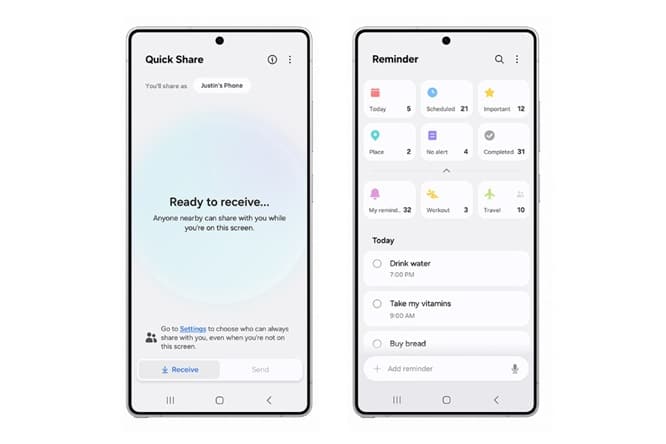
Additionally, Samsung has enhanced Quick Share to simplify sharing memories, photos, and documents with family, friends, and colleagues. With one tap from the Quick Settings panel, users can instantly send or receive files. The improved interface reduces friction and speeds up the sharing process, especially in group settings or while multitasking.
The Reminder app has also received a thoughtful overhaul in One UI 8. Now, it acts as a travel companion and personal planner. Whether you’re organizing a family trip to New York or handling daily errands, the updated UX allows you to create and manage checklists in one place. You can also easily share to-do lists with others and use voice input to quickly add reminders when your hands are full, like while shopping or commuting.
Following its beta debut on the Galaxy S25 series today, Samsung should expand beta programs to more devices soon. The stable One UI 8 update arrives later this summer, shipping out of the box in the Galaxy Z Fold 7 and Flip 7.

Written by
Sumit AdhikariSumit, a life-long Samsung user, is passionate about technology and has been professionally writing on tech since 2017. He’s a mathematics graduate by education and enjoys teaching basic mathematics tricks to school kids in his spare time. Sumit believes in artificial intelligence and dreams of a fully open, intelligent and connected world.

Follow us on Google Discover & set us as a preferred source in Google News
Share this Post
___________________________


New Blog Posts
___________________________

First Set of Pixel 11 Pro XL Renders Are Here
Pixel 11 Pro XL CAD renders show minimal design changes

Is Samsung Preparing One UI 8.5 Beta for Galaxy Z Fold 5 and Flip 5?
Samsung may launch a One UI 8.5 beta program for its 2023 foldables

Galaxy S25 One UI 8.5 Beta May Run Longer Than Expected
Galaxy S25 series’ One UI 8.5 beta may stretch to 10 rounds







