
Google Photos Brings a Floating Bottom Toolbar
SammyGuru is reader-supported. We have affiliate and sponsored partnerships, so we may earn a commission when you buy through links on our site — at no extra cost to you. Learn more.
Google Photos has made a key improvement to align with the modern design language. The app brings a new pill-shaped floating bottom toolbar to make navigation easier and give the app a fresh look. This change is currently rolling out on iOS, though Android users should get it in the coming weeks.
The floating bottom toolbar makes navigation easier in Google Photos
Introduced first on the Google Chat app in December 2023, the floating toolbar has now made its way to Google Photos. The new design replaces the traditional bottom bar with a persistent toolbar that remains visible while scrolling. The placement is high enough on the screen so it doesn’t interrupt your photo viewing experience.
The toolbar features three tabs (Photos, Collections, and Create) that sit within a pill-shaped container. When a tab is active, another pill indicator shows up to highlight your current section. There’s also a floating action button (FAB) that allows you to search your photos or ask questions, making navigation more convenient.
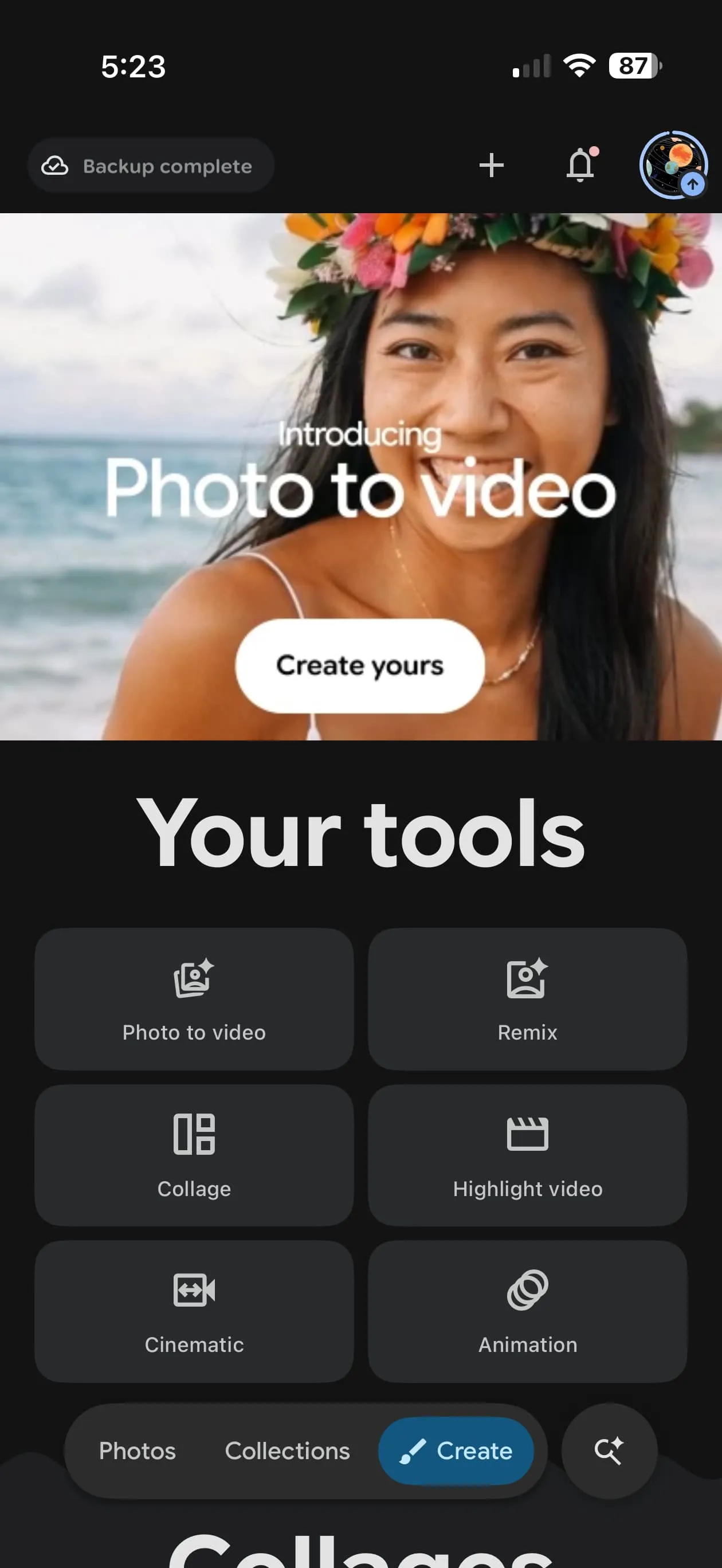
Apart from the redesigned toolbar, Google Photos recently improved its creative tools. You can now create videos (from photos) using custom prompts — describe the style, movement types, or effects you want. The app also suggests prompts to help you get started, while allowing you to edit the video after generation.
Meanwhile, Google Photos is testing tweaks to the Collage Editor. The new layout separates Templates and Borders into their own tabs, rather than listing them in a long, scrollable menu. On top of that, you get more control over the appearance of your collages with options like changing frame thickness, corner curves, and colors.
While some of these features are still in development and may not arrive immediately, the floating toolbar is already rolling out in version 7.63 of the iOS Google Photos app. If you use a Galaxy device, make sure to keep the app up to date, as the feature may arrive on Android as well at any time.

Written by
Binay KonwarBinay Konwar started his blogging journey in 2014 and has since written plenty of tech articles. At present, he is working as a News Writer at SammyGuru, covering everything about Samsung. He holds a Master's degree in Mathematics, but his real passion lies in tech and writing. In his free time, he enjoys playing chess and watching movies.

Follow us on Google Discover & set us as a preferred source in Google News
Share this Post
___________________________


New Blog Posts
___________________________

First Set of Pixel 11 Pro XL Renders Are Here
Pixel 11 Pro XL CAD renders show minimal design changes

Is Samsung Preparing One UI 8.5 Beta for Galaxy Z Fold 5 and Flip 5?
Samsung may launch a One UI 8.5 beta program for its 2023 foldables

Galaxy S25 One UI 8.5 Beta May Run Longer Than Expected
Galaxy S25 series’ One UI 8.5 beta may stretch to 10 rounds







