
Gemini Can Now Analyze Google Drive Videos and Answer Your Queries
SammyGuru is reader-supported. We have affiliate and sponsored partnerships, so we may earn a commission when you buy through links on our site — at no extra cost to you. Learn more.
Ever spent hours sifting through long videos just to find that one key moment? Yeah, I’m sure most of us have been there. Luckily, Gemini can now save you loads of time by analyzing the videos in your Google Drive for you.
Gemini will now summarize Google Drive videos for you
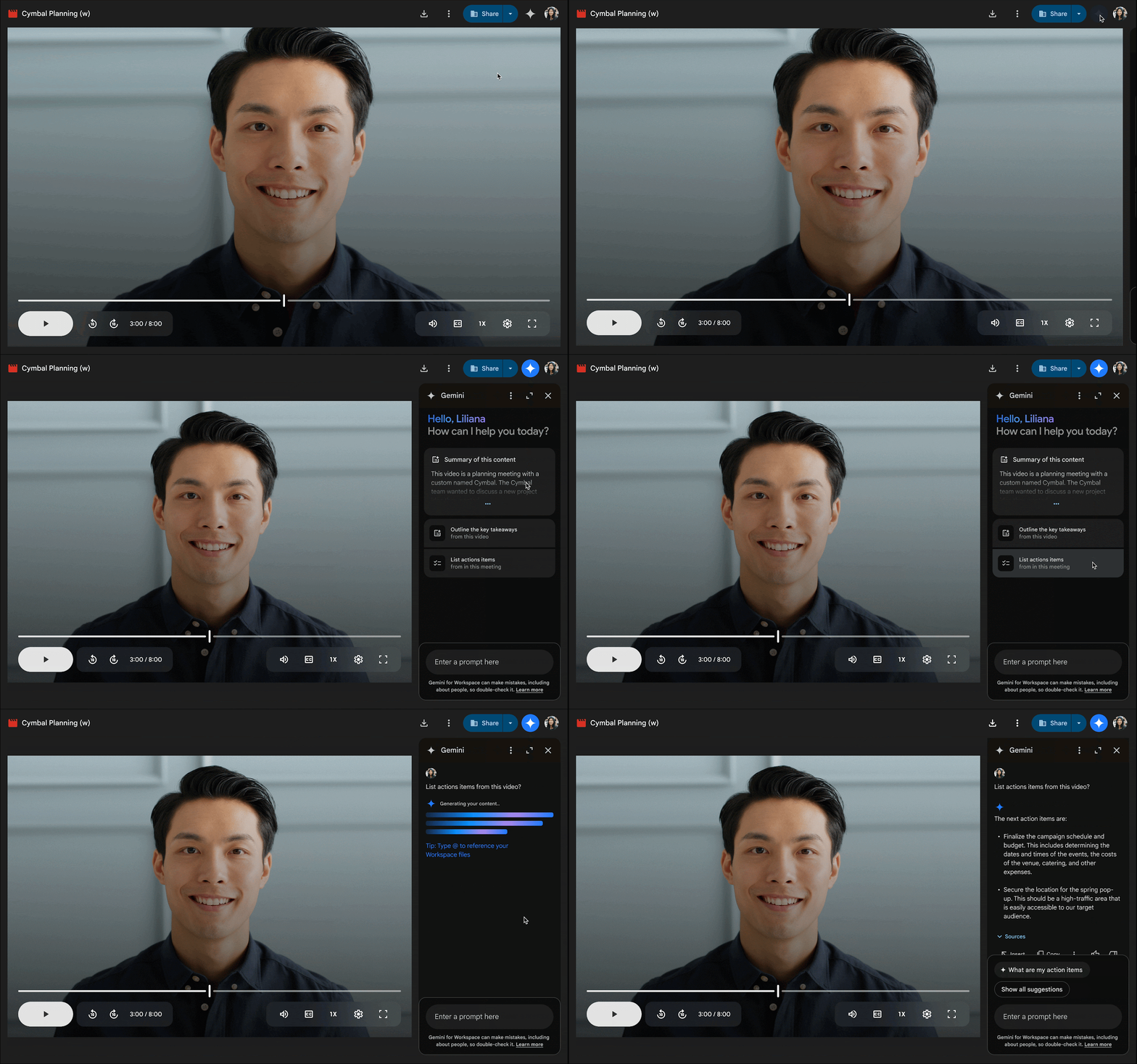
Google is rolling out a new feature in Drive that lets Gemini summarize videos for you. That means you don’t have to sit through an entire recording just to find out what was discussed. Simply open a video file in the preview window or a new tab and you’ll see a small Gemini icon in the top right corner. Next, click it and you can ask questions like “Summarize this video,” “What are the highlights?”, or “List action items from this meeting.” Gemini uses the video’s captions to understand the content so be sure captions are turned on.
For now, it’s available in English only. It is rolling out to Google Workspace users on Business Standard, Business Plus, Enterprise Standard, Enterprise Plus, and Gemini Education plans. Google One AI Premium subscribers and those who have purchased Gemini Business or Enterprise add-ons also get access, as 9to5Google notes.
Additionally, the Drive’s video player now shows how many times a video has been opened. You will find this under the Details panel in the Analytics section. This feature is available to all Google Workspace users, Workspace Individual subscribers, and even personal Google account holders.
Google is rolling out this feature gradually so it might not show up right away. For some users it could take up to 15 days. For others, it may appear within three days after June 16. The timing depends on how your Google Workspace account is set up by your organization. Just keep an eye out as the feature should be available soon.

Written by
Abhinav AnandAbhinav Anand is the News Editor at SammyGuru and a technology journalist based in New Delhi. Before joining SammyGuru, he contributed to numerous outlets, including Android Headlines, ExtremeTech, The Mac Observer, Financial Express, Economic Times, iGeeksBlog, KnowTechie, PhonesWiki, SlashGear, and more. You can reach him at abhinav@sammyguru.com.

Follow us on Google Discover & set us as a preferred source in Google News
Share this Post
___________________________


New Blog Posts
___________________________

First Set of Pixel 11 Pro XL Renders Are Here
Pixel 11 Pro XL CAD renders show minimal design changes

Is Samsung Preparing One UI 8.5 Beta for Galaxy Z Fold 5 and Flip 5?
Samsung may launch a One UI 8.5 beta program for its 2023 foldables

Galaxy S25 One UI 8.5 Beta May Run Longer Than Expected
Galaxy S25 series’ One UI 8.5 beta may stretch to 10 rounds







