
Samsung Vision Model Gets Massive Update — What Does it Do?
SammyGuru is reader-supported. We have affiliate and sponsored partnerships, so we may earn a commission when you buy through links on our site — at no extra cost to you. Learn more.
Samsung’s Galaxy smartphones offer a bunch of AI features to boost productivity. The company keeps introducing new tools and improving the existing Galaxy AI suite with regular updates. It recently rolled out a nearly 2GB update for the Samsung Vision Model app, and some users might be wondering what this app does. In short, Samsung Vision Model is the brain behind generative AI-based solutions that are part of Galaxy AI.
What is the Samsung Vision AI Model app?
The Samsung Vision AI Model app is an integral part of the Galaxy AI for generative AI solutions. Samsung offers a bunch of generative AI solutions to enhance communication, creativity, and productivity. These include Writing Assist, Live Translate, Drawing Assist, AI Select, Browsing Assist, Now Brief, and more. And Vision AI Model handles on-device processing for all of these AI capabilities from the backend, ensuring a seamless user experience.
Since generative AI-based solutions require a lot of data and information for accurate results, Samsung’s Vision AI Model app is massive in size. For example, Live Translate uses AI to translate your voice in real time during calls. So, the Vision AI Model app needs to keep adding extensive language datasets for better speech recognition. The latest version (2.0.05.17) should bring improvement to several generative AI solutions for an enhanced user experience.
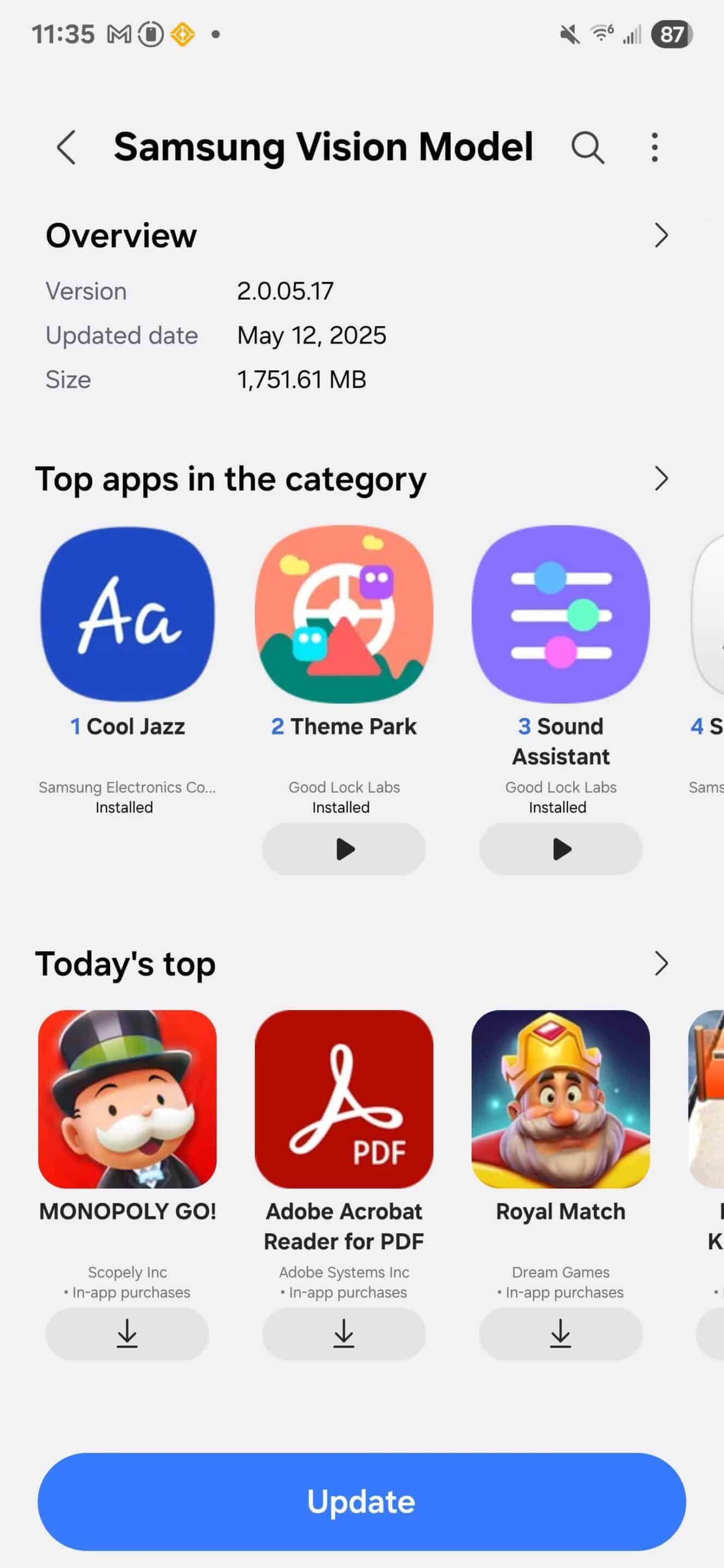
If you want to take advantage of Samsung’s advanced generative AI solutions on your Galaxy phone, you should update to the latest version of the Vision AI Model app as quickly as possible. Do note that it’s not a user-facing app, but this update aims to give users accurate generative AI results. You can check for the update by going to the Galaxy Store (Menu > Updates) or visit this direct Galaxy Store link on your phone to download the latest version.

Written by
Binay KonwarBinay Konwar started his blogging journey in 2014 and has since written plenty of tech articles. At present, he is working as a News Writer at SammyGuru, covering everything about Samsung. He holds a Master's degree in Mathematics, but his real passion lies in tech and writing. In his free time, he enjoys playing chess and watching movies.

Follow us on Google Discover & set us as a preferred source in Google News
Share this Post
___________________________


New Blog Posts
___________________________

First Set of Pixel 11 Pro XL Renders Are Here
Pixel 11 Pro XL CAD renders show minimal design changes

Is Samsung Preparing One UI 8.5 Beta for Galaxy Z Fold 5 and Flip 5?
Samsung may launch a One UI 8.5 beta program for its 2023 foldables

Galaxy S25 One UI 8.5 Beta May Run Longer Than Expected
Galaxy S25 series’ One UI 8.5 beta may stretch to 10 rounds







