
Google Messages May Finally Expand Its Annoying Compose Box Limit
SammyGuru is reader-supported. We have affiliate and sponsored partnerships, so we may earn a commission when you buy through links on our site — at no extra cost to you. Learn more.
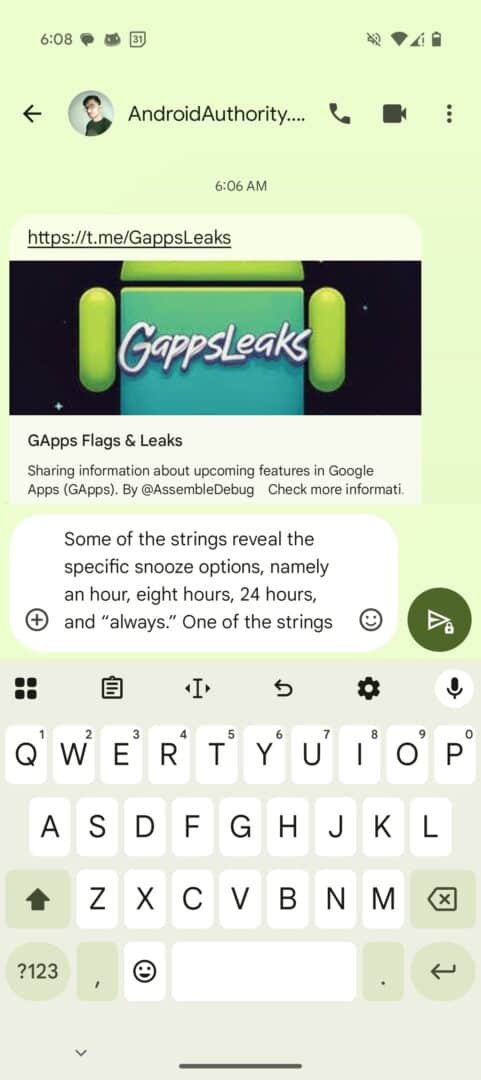
Typing a long message in Google Messages is a bit annoying as it has a compose box size limit. Since it was originally designed with SMS in mind, the compose box lets you see only 4 lines of text. You can not see the rest of your text, so you must either send shorter messages or scroll up and down while typing to see the full message. Now, it looks like Google Messages will finally address this long-standing annoyance.
Google Messages beta expands compose box text limit to 12 lines
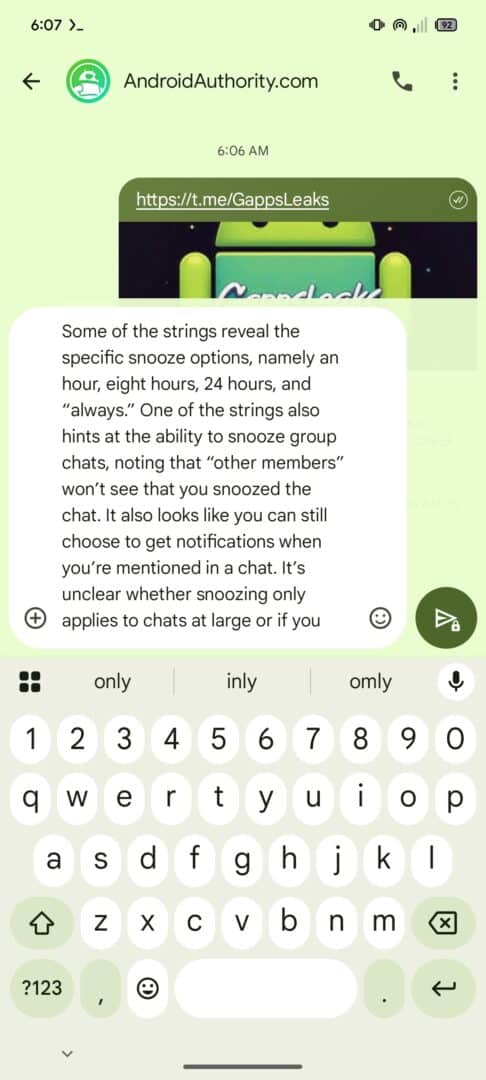
On the latest Beta version of the Google Messages app, Android Authority discovered that the compose box size limit issue has been fixed. Instead of the usual 4 lines of text, you can now see 12 lines of text in the compose box. This is a change that users have requested for a long time. It might also give the usage of RCS messaging a boost, though Google needs to make RCS more stable and reliable.
-
- Current
-
- Upcoming
The side-by-side comparison above shows a noticeable difference in the spacing and visibility of text. It no longer stuffs the messages into a tiny space which leaves users scrolling. Instead, the beta version shows a large text box. Your words won’t take up the entire screen, but the compose box has better spacing and height.
The current system works fine if you type short texts that don’t exceed 4 lines. But the latest changes will make the experience better for everyone. You no longer have to scroll up and down multiple times to view what you typed. You can continue typing long texts up to 12 lines, and it will still remain visible. This now puts Google Messages on par with other popular messaging apps, and users will take RCS messaging more seriously now.
However, the feature has not yet been officially released. It is currently only available in the beta version via APK teardown. For those who want to try out the new change, it’s available with the beta version “messages.android_20250402_00_RC00.phone.openbeta_dynamic” of the Google Messages app. Google may or may not make it available to the public in the next Messages app update.

Written by
Binay KonwarBinay Konwar started his blogging journey in 2014 and has since written plenty of tech articles. At present, he is working as a News Writer at SammyGuru, covering everything about Samsung. He holds a Master's degree in Mathematics, but his real passion lies in tech and writing. In his free time, he enjoys playing chess and watching movies.

Follow us on Google Discover & set us as a preferred source in Google News
Share this Post
___________________________


New Blog Posts
___________________________

First Set of Pixel 11 Pro XL Renders Are Here
Pixel 11 Pro XL CAD renders show minimal design changes

Is Samsung Preparing One UI 8.5 Beta for Galaxy Z Fold 5 and Flip 5?
Samsung may launch a One UI 8.5 beta program for its 2023 foldables

Galaxy S25 One UI 8.5 Beta May Run Longer Than Expected
Galaxy S25 series’ One UI 8.5 beta may stretch to 10 rounds







