
Samsung Adds “Inactivity Restart” Security Feature to Galaxy Phones
SammyGuru is reader-supported. We have affiliate and sponsored partnerships, so we may earn a commission when you buy through links on our site — at no extra cost to you. Learn more.
Samsung is rolling out a new security feature for Galaxy smartphones called Inactivity restart. Designed to strengthen device protection, the feature automatically restarts a phone if it remains locked for an extended period. A recent security update appears to have added the function to supported models.
Galaxy devices can now restart automatically if unused for several days
The new option sits inside Settings > Security and Privacy > More security settings. The “Inactivity restart” toggle is enabled by default, and it automatically restarts the phone if it stays locked for 72 consecutive hours. If the system detects that the device has remained unused and locked for three straight days, it will reboot on its own.
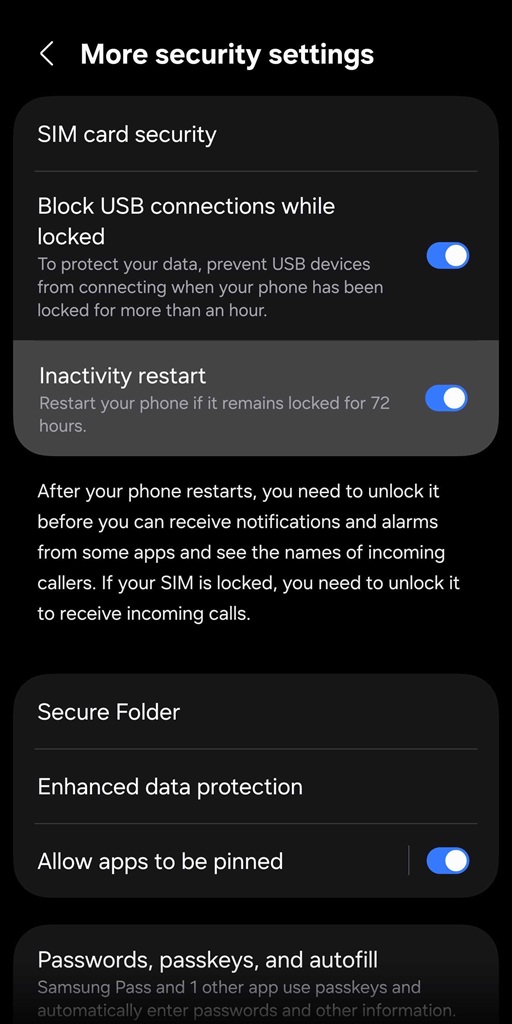
This can help prevent potential misuse if you lose your phone. When a Galaxy phone restarts, it enters a more secure state that limits access until the user unlocks it with a PIN, password, or biometrics. During this period, certain features remain restricted, including notifications from some apps, caller details, and alarms.
In practice, this means that anyone who finds or steals your phone won’t be able to access much information after the restart. The device requires authentication before restoring normal functionality. However, for the feature to work as intended, it’s important that your phone is locked in the first place. Otherwise, the inactivity timer won’t trigger, making the feature ineffective.
While Samsung never officially announced its rollout, a recent security update seemingly added Inactivity restart to a bunch of Galaxy phones. We can confirm its availability on Galaxy S25 units running One UI 8.5 Beta. It’s also available on the Galaxy Z Fold 7 on One UI 8. However, the newly launched Galaxy S26 phones lack the feature. Samsung may add it with an upcoming update for the new flagships. We will keep you posted.

Written by
Sumit AdhikariSumit, a life-long Samsung user, is passionate about technology and has been professionally writing on tech since 2017. He’s a mathematics graduate by education and enjoys teaching basic mathematics tricks to school kids in his spare time. Sumit believes in artificial intelligence and dreams of a fully open, intelligent and connected world.

Follow us on Google Discover & set us as a preferred source in Google News
Share this Post
___________________________


New Blog Posts
___________________________

First Set of Pixel 11 Pro XL Renders Are Here
Pixel 11 Pro XL CAD renders show minimal design changes

Is Samsung Preparing One UI 8.5 Beta for Galaxy Z Fold 5 and Flip 5?
Samsung may launch a One UI 8.5 beta program for its 2023 foldables

Galaxy S25 One UI 8.5 Beta May Run Longer Than Expected
Galaxy S25 series’ One UI 8.5 beta may stretch to 10 rounds







