
Pasting Laptop Text to Your Galaxy Phone Will Soon Be Easier
SammyGuru is reader-supported. We have affiliate and sponsored partnerships, so we may earn a commission when you buy through links on our site — at no extra cost to you. Learn more.
If you are working on your Windows laptop or PC and want to send a long text to your Android phone, you normally email it to yourself or use a messaging app. Thankfully, Microsoft will make this process much easier by introducing a new feature called Access PC’s Clipboard in Windows 11. This will let you paste copied text from your laptop directly to your Galaxy phone.
You can now send texts from a Windows 11 PC to your phone effortlessly
According to a report from WindowsLatest, Microsoft is testing this new clipboard feature in the latest dev build of Windows 11. The description reads “Allow this device to access content that I copy on this PC.” To use it, you first need to install the Link to Windows app on your Android phone. After you complete the setup process, enable the feature within the Phone Link app on your laptop. Note that both your laptop and phone must be signed in with the same Microsoft account.
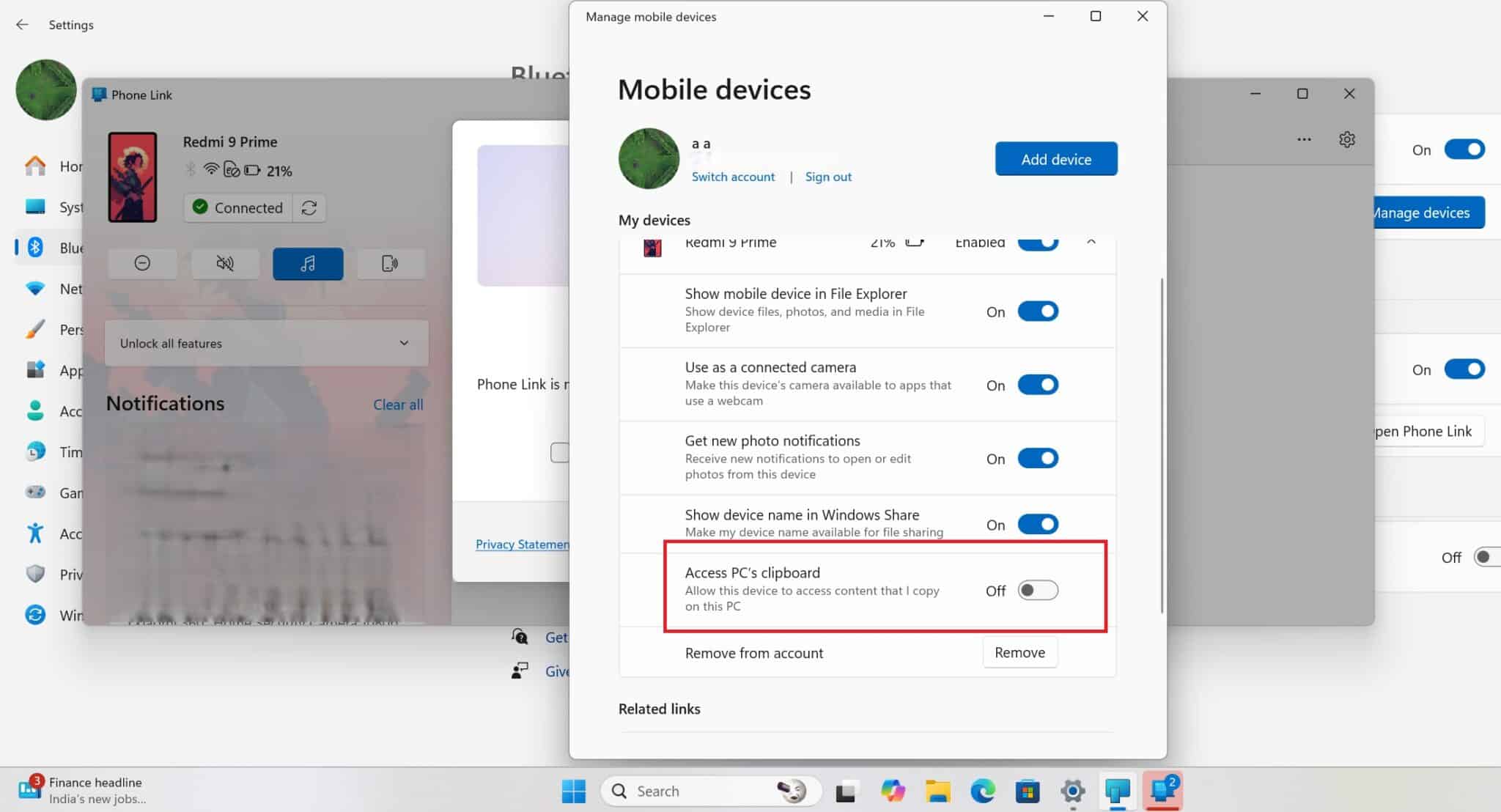
Now, when you copy any text on your Windows 11 device, it will instantly show up on your Galaxy phone’s keyboard clipboard. The publication tested this feature with popular keyboards such as Gboard and Samsung Keyboard, and it worked perfectly. This will definitely come in handy when you want to share complex passwords, codes, or long texts.
It is worth noting that the Link to Windows app already has a similar feature called Cross-Device Copy and Paste. However, this feature syncs the clipboard both ways — PC to phone and phone to PC. On the other hand, the new feature only brings the PC’s clipboard to the phone. This is particularly helpful if you want your PC’s clipboard available on your phone, but don’t want your phone’s clipboard to show up on your PC.
As of now, Access PC’s Clipboard feature is available only in the Windows 11 dev build, but it should reach the stable channel in the coming weeks. If you are using a Galaxy smartphone and a Windows 11 PC or laptop, this update will make copying and pasting text between your devices much simpler.

Written by
Binay KonwarBinay Konwar started his blogging journey in 2014 and has since written plenty of tech articles. At present, he is working as a News Writer at SammyGuru, covering everything about Samsung. He holds a Master's degree in Mathematics, but his real passion lies in tech and writing. In his free time, he enjoys playing chess and watching movies.

Follow us on Google Discover & set us as a preferred source in Google News
Share this Post
___________________________


New Blog Posts
___________________________

First Set of Pixel 11 Pro XL Renders Are Here
Pixel 11 Pro XL CAD renders show minimal design changes

Is Samsung Preparing One UI 8.5 Beta for Galaxy Z Fold 5 and Flip 5?
Samsung may launch a One UI 8.5 beta program for its 2023 foldables

Galaxy S25 One UI 8.5 Beta May Run Longer Than Expected
Galaxy S25 series’ One UI 8.5 beta may stretch to 10 rounds







