
New AI Overviews Text Chips Land in Google App Beta with Circle to Search
SammyGuru is reader-supported. We have affiliate and sponsored partnerships, so we may earn a commission when you buy through links on our site — at no extra cost to you. Learn more.
Google has made searching even easier by improving its AI Overviews in search. The company has recently released a beta version of its Google app that includes new text chips for AI Overviews through the Circle to Search feature. These new text chips are mainly useful when using the Circle to Search feature on images containing a large amount of text.
If you are unaware, AI Overviews is a search feature that offers AI-generated summaries of topics with links to relevant websites. On the other hand, Circle to Search leverages AI to display information on your screen without switching apps. Users can create a circle on an image to start a search.
Circle to Search adds new text chips for AI Overviews
According to a report from Android Authority, Google app’s latest beta build, version 16.11.36, adds three new text chips to the AI Overviews screen when using Circle to Search. If you circle an image containing a lot of text, AI Overviews can summarize, explain, and even extract the text from the image. This functionality might also work on Google Lens, but Android Authority has not confirmed it yet.
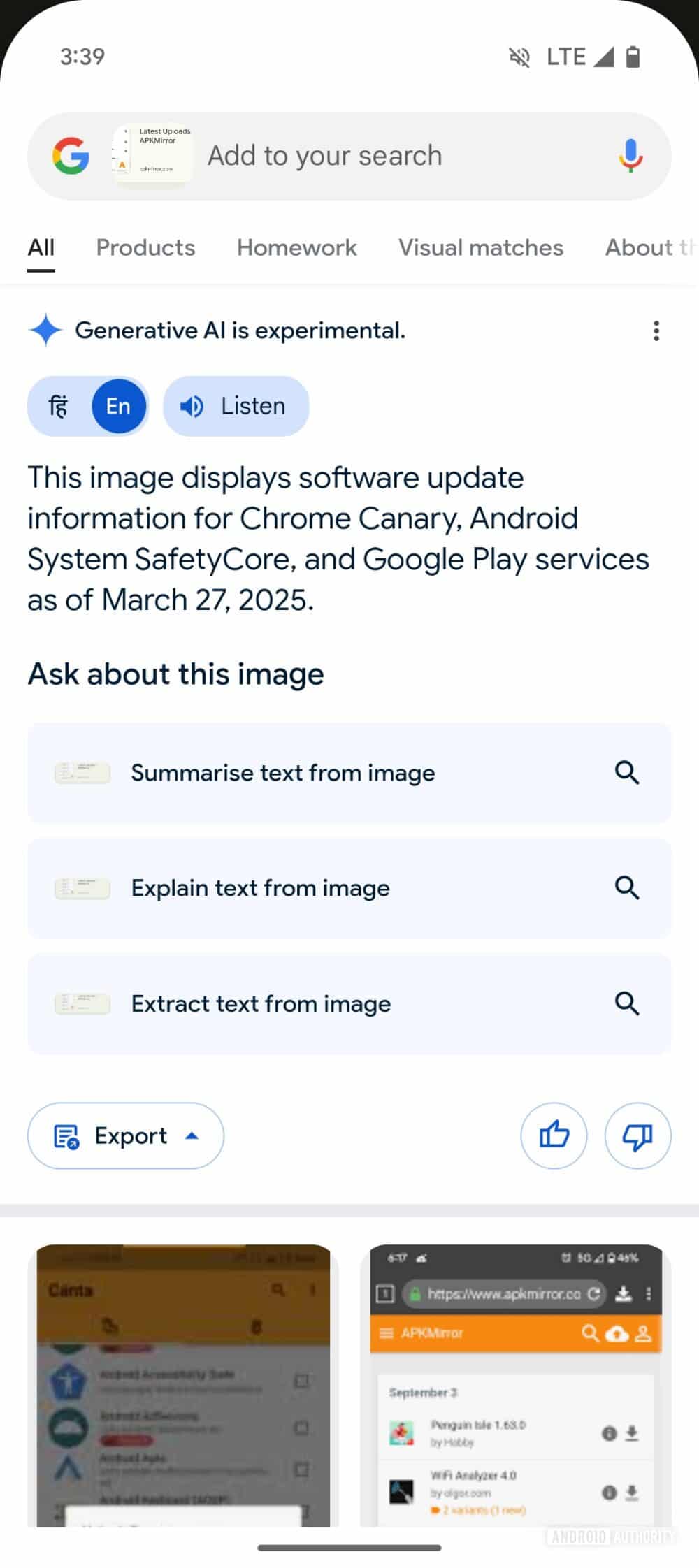
The newest Google app beta adds three new AI Overview chips for Circle to Search. These chips help users understand text better:
- Summarize text from image: It creates an AI summary of the text, offering bullet points and external web content links.
- Explain text from image: It mainly focuses on explaining the text with a short AI summary.
- Extract text from image: This text chip is very useful as it lets users copy all the words from an image.
As of now, these text chips are rolling out via server-side flags in the latest beta, so you might get them by sideloading. Google has not shared details yet, but these text chips should reach all users soon in the stable branch. If you don’t want them, you can disable AI Overviews.

Written by
Binay KonwarBinay Konwar started his blogging journey in 2014 and has since written plenty of tech articles. At present, he is working as a News Writer at SammyGuru, covering everything about Samsung. He holds a Master's degree in Mathematics, but his real passion lies in tech and writing. In his free time, he enjoys playing chess and watching movies.

Follow us on Google Discover & set us as a preferred source in Google News
Share this Post
___________________________


New Blog Posts
___________________________

First Set of Pixel 11 Pro XL Renders Are Here
Pixel 11 Pro XL CAD renders show minimal design changes

Is Samsung Preparing One UI 8.5 Beta for Galaxy Z Fold 5 and Flip 5?
Samsung may launch a One UI 8.5 beta program for its 2023 foldables

Galaxy S25 One UI 8.5 Beta May Run Longer Than Expected
Galaxy S25 series’ One UI 8.5 beta may stretch to 10 rounds







