
Samsung Smart Fridge Will Soon Display Ads and Here’s How to Stop Them
SammyGuru is reader-supported. We have affiliate and sponsored partnerships, so we may earn a commission when you buy through links on our site — at no extra cost to you. Learn more.
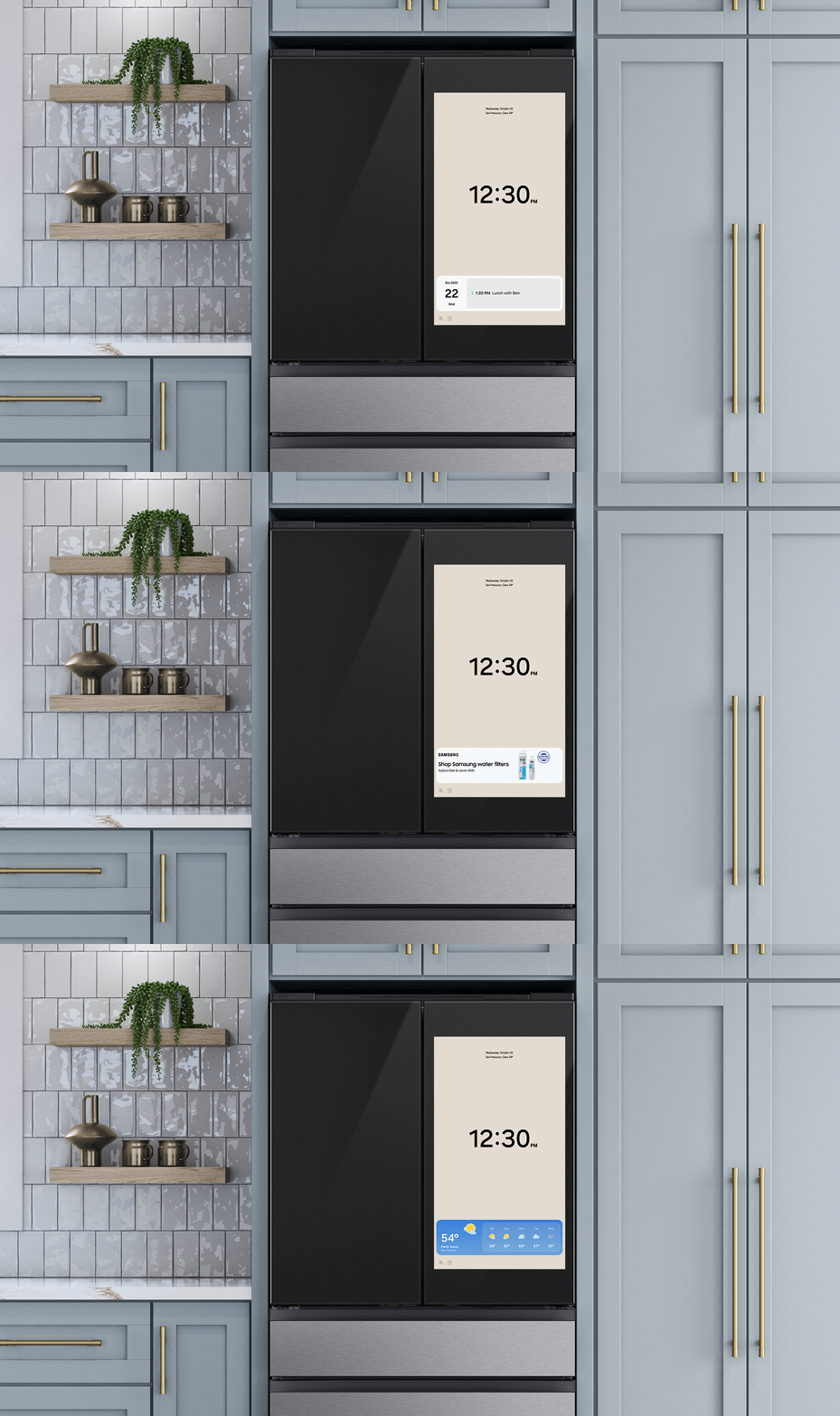
Samsung is rolling out a firmware update for Family Hub smart refrigerators, which brings a number of features and one disappointment. The update introduces voice recognition for Bixby, widgets for news, weather, and calendar, and a new Daily Board screen with six tiles. However, some parts of the fridge screen will now display ads. Fret not, we’ll show you how to remove them, but first, here’s the full story.
Samsung smart fridge update brings ads to your kitchen
These ads will mostly appear in the Cover Screen widgets, which include Calendar, News, Weather, and a new ad-specific widget, The Verge reports. The widgets rotate every ten seconds, so ads will cycle alongside other information. Ads will also appear on one tile of the Daily Board screen, but they are designed to be small and unobtrusive. If the Cover Screen is set to the Art or Album theme, no ads will appear.
At first, the ads will only promote Samsung products and services, like water filters, appliance accessories, and SmartThings items. Samsung may allow third-party ads in the future, depending on user feedback. The company has also stated that these ads are not personalized and that the refrigerator doesn’t collect personal information.
The update is rolling out for Family Hub fridges with 21.5-inch and 32-inch screens. Smaller fridges with 9-inch screens or less will not receive ads, Samsung confirmed. Other smart appliances, such as ovens, dryers, and washing machines with 7- or 9-inch screens, are not affected either.
How to remove ads from your Samsung smart fridge?
There are two ways to stop the ads. You can turn them off completely by going to Settings > Advertisements and switching off the toggle. This removes all ads, but it also disables the widget, so you won’t see news, calendar, or weather updates. Or you can dismiss individual ads by tapping the X. That blocks that ad for the current campaign but keeps the widget running.
The update started rolling out on October 27, 2025, and ads should show up soon after. If you don’t want ads, you can either turn them off completely or just dismiss the ones you don’t want while keeping other smart features.

Written by
Abhinav AnandAbhinav Anand is the News Editor at SammyGuru and a technology journalist based in New Delhi. Before joining SammyGuru, he contributed to numerous outlets, including Android Headlines, ExtremeTech, The Mac Observer, Financial Express, Economic Times, iGeeksBlog, KnowTechie, PhonesWiki, SlashGear, and more. You can reach him at abhinav@sammyguru.com.

Follow us on Google Discover & set us as a preferred source in Google News
Share this Post
___________________________


New Blog Posts
___________________________

First Set of Pixel 11 Pro XL Renders Are Here
Pixel 11 Pro XL CAD renders show minimal design changes

Is Samsung Preparing One UI 8.5 Beta for Galaxy Z Fold 5 and Flip 5?
Samsung may launch a One UI 8.5 beta program for its 2023 foldables

Galaxy S25 One UI 8.5 Beta May Run Longer Than Expected
Galaxy S25 series’ One UI 8.5 beta may stretch to 10 rounds







