
Here’s How You Can Enable Fullscreen Mode in DeX on One UI 8
SammyGuru is reader-supported. We have affiliate and sponsored partnerships, so we may earn a commission when you buy through links on our site — at no extra cost to you. Learn more.
Samsung recently updated its DeX desktop experience in One UI 8 by switching to Android 16’s built-in Desktop Mode. This change made DeX simpler and more compatible with Android, but it also removed some useful features from the older version. One feature most of us assumed the DeX axed was the ability to use apps in true fullscreen.
Here’s how to enter fullscreen mode in One UI 8’s DeX!
In the older DeX, when you watched videos or used apps in fullscreen, the taskbar and app header would disappear. But in the new One UI 8 version, those bars stay visible even in fullscreen mode. Because of this, many thought Samsung had removed the fullscreen option entirely. Which, thankfully, isn’t the case.
Reddit user horgeluem (via Android Authority) spotted a hidden “Immersive” fullscreen mode that enables a true fullscreen experience by hiding both the app header and the taskbar. Here’s how to activate it.
1. Open an app in Samsung DeX that you want to use or watch in fullscreen.
2. Click the maximize button (the square icon) on the app’s title bar to expand the window to fill the screen.
3. Press and hold (long-press) the maximize button. A small dropdown menu will appear with three options: Immersive, Restore and Resize.
4. Select Immersive from this menu. Once the app’s header bar and taskbar will disappear, and you’ll be in true fullscreen mode on DeX.
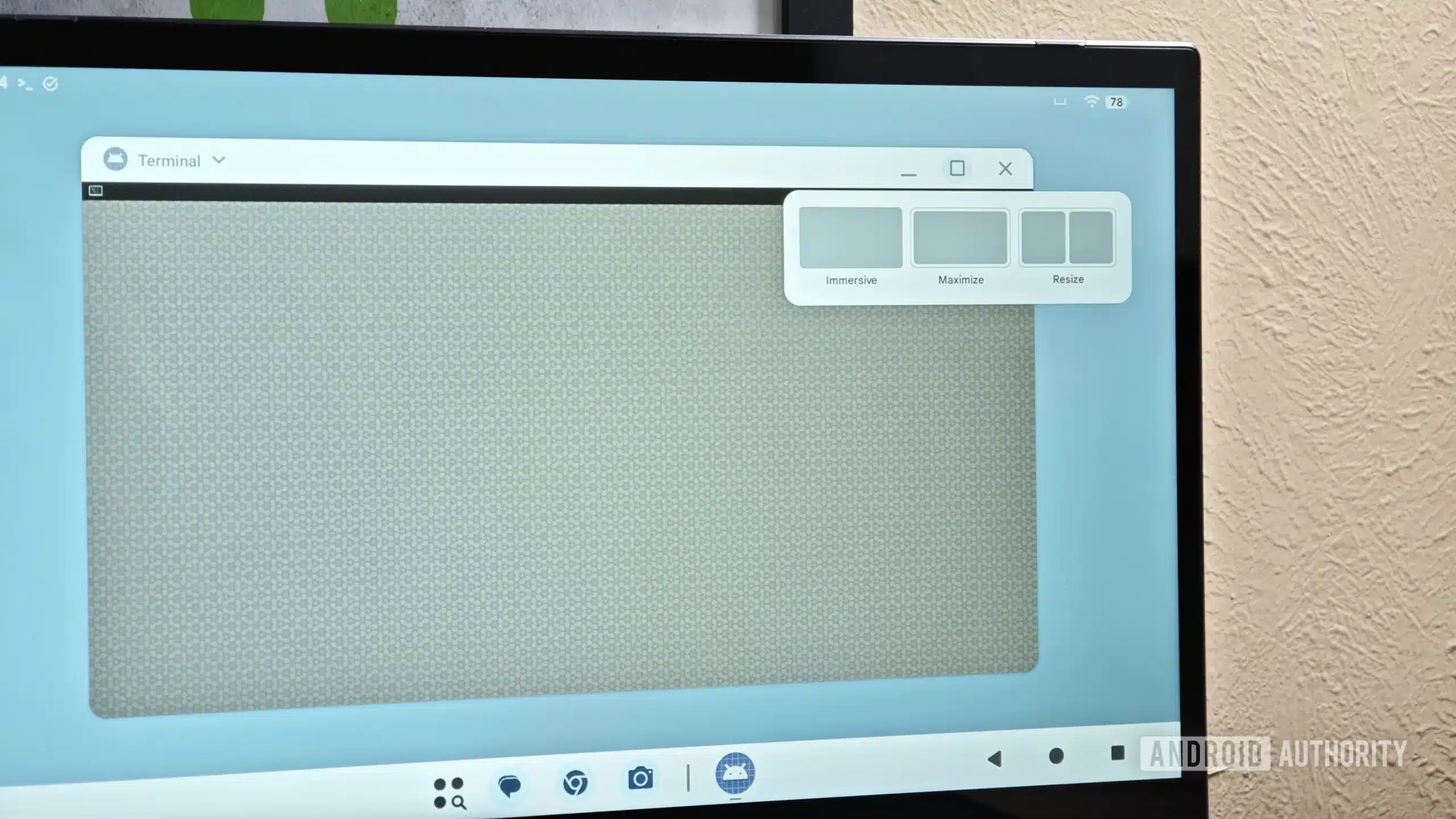
Credits: Android Authority
To exit, you can long-press the maximize button again and choose Restore from the dropdown to bring back the header and taskbar. This hidden long-press on the maximize button is the only way to activate the immersive fullscreen mode in DeX on One UI 8 for now. It’s not visible anywhere in the UI, so it’s easy to miss unless you know about it.

Written by
Abhinav AnandAbhinav Anand is the News Editor at SammyGuru and a technology journalist based in New Delhi. Before joining SammyGuru, he contributed to numerous outlets, including Android Headlines, ExtremeTech, The Mac Observer, Financial Express, Economic Times, iGeeksBlog, KnowTechie, PhonesWiki, SlashGear, and more. You can reach him at abhinav@sammyguru.com.

Follow us on Google Discover & set us as a preferred source in Google News
Share this Post
___________________________


New Blog Posts
___________________________

First Set of Pixel 11 Pro XL Renders Are Here
Pixel 11 Pro XL CAD renders show minimal design changes

Is Samsung Preparing One UI 8.5 Beta for Galaxy Z Fold 5 and Flip 5?
Samsung may launch a One UI 8.5 beta program for its 2023 foldables

Galaxy S25 One UI 8.5 Beta May Run Longer Than Expected
Galaxy S25 series’ One UI 8.5 beta may stretch to 10 rounds







