
Google Quietly Adds Rollback Feature to Play System Updates, But Should You?
SammyGuru is reader-supported. We have affiliate and sponsored partnerships, so we may earn a commission when you buy through links on our site — at no extra cost to you. Learn more.
Google Play System updates are background updates that refresh core parts of Android without a full system update. They install quietly and usually just improve security and basic functions. Unless something breaks, you barely notice them. Unlike regular apps, though, these Play system updates been hard to uninstall. Thankfully, Google is finally fixing that.
You now have an option to uninstall those pesky Google Play system updates
A new option inside Google Play Services is starting to appear on some Android phones, Android Authority reports. It is tucked under a section called Mainline services. This is the place where Google bundles all the modular system components that can be updated through the Play Store instead of a traditional firmware update.
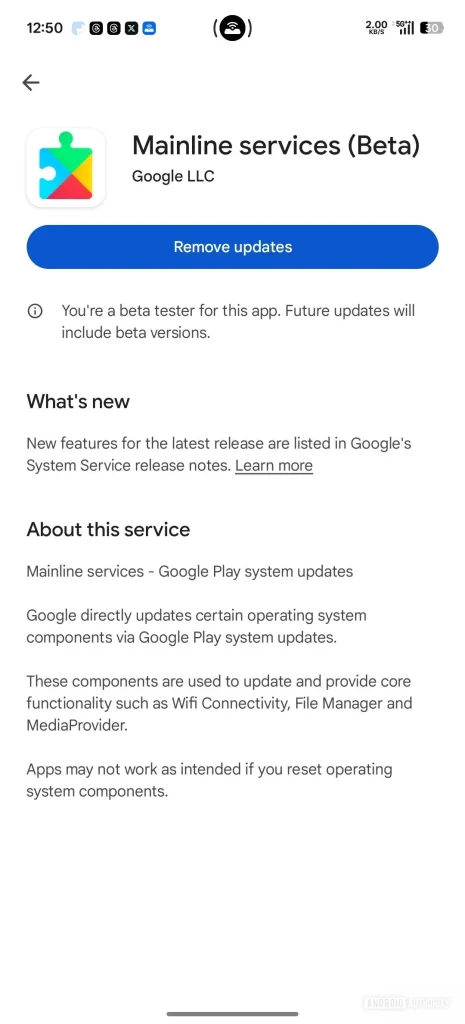
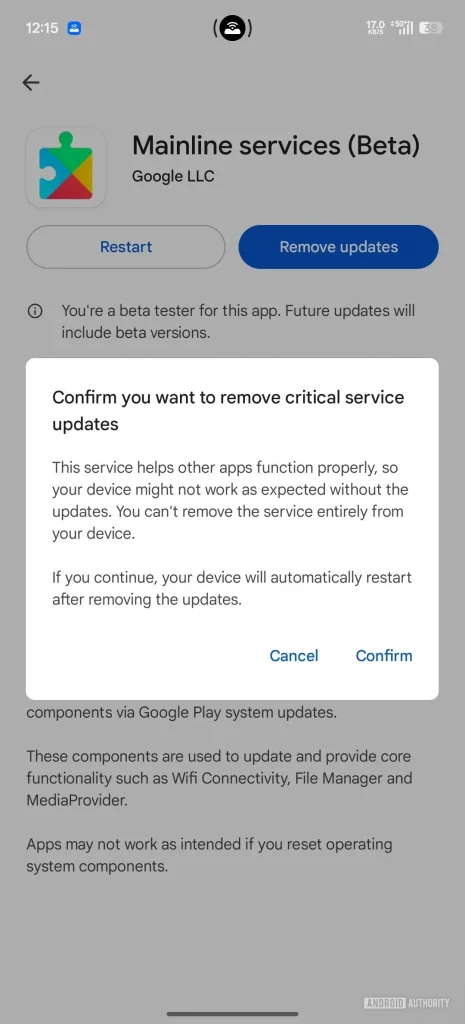
Opening Mainline services takes you to its Play Store page. The layout changes depending on whether your phone has already installed a Play System update or is waiting for one. Normally, once an update is downloaded, your phone asks you to restart. After the restart, the update is considered active and you cannot undo it without using a computer.
This is the part Google is improving. Some users are now seeing a new button called Remove updates. This lets you uninstall the most recent Google Play System update directly from the phone. Android shows a warning that removing these updates might affect features or stability, but the rollback works. After removing it, the same update shows up as available for installation again, so you can reinstall it whenever you want.
So, should you remove an update? In most cases, no. Google has not announced this feature publicly. It looks like a recovery tool meant for rare situations, not something you should use casually. Even so, having it on the device is a major step forward. If a Play System update breaks biometrics, causes battery drain, or triggers random issues, you will not have to plug your phone into a laptop or touch ADB tools. You can simply remove the update from the same menu where it was installed.

Written by
Abhinav AnandAbhinav Anand is the News Editor at SammyGuru and a technology journalist based in New Delhi. Before joining SammyGuru, he contributed to numerous outlets, including Android Headlines, ExtremeTech, The Mac Observer, Financial Express, Economic Times, iGeeksBlog, KnowTechie, PhonesWiki, SlashGear, and more. You can reach him at abhinav@sammyguru.com.

Follow us on Google Discover & set us as a preferred source in Google News
Share this Post
___________________________


New Blog Posts
___________________________

First Set of Pixel 11 Pro XL Renders Are Here
Pixel 11 Pro XL CAD renders show minimal design changes

Is Samsung Preparing One UI 8.5 Beta for Galaxy Z Fold 5 and Flip 5?
Samsung may launch a One UI 8.5 beta program for its 2023 foldables

Galaxy S25 One UI 8.5 Beta May Run Longer Than Expected
Galaxy S25 series’ One UI 8.5 beta may stretch to 10 rounds







