
Google Messages Adds Dynamic Context Menu for Improved Usability
SammyGuru is reader-supported. We have affiliate and sponsored partnerships, so we may earn a commission when you buy through links on our site — at no extra cost to you. Learn more.
Google Messages is making it easier to access chat options, particularly on large-screen phones. The company brings a dynamic context menu that appears when you long-press the message. As of now, this change is part of the Google Messages Beta program, meaning only beta users can taste it. Regular users should get the feature in the coming weeks.
The dynamic context menu makes accessing chat options faster
Back in October 2025, we learned that Google was working on a new context menu for its Messages app. The company has now started rolling out this feature to beta users, according to PhoneArena. Now, when you long-press a message, a vertical menu shows up right below it. This menu includes a host of options such as Reply, Forward, Copy, Star, Delete, Select more, and Info. Above the message, you will see a small reaction menu that lets you quickly add an emoji response.
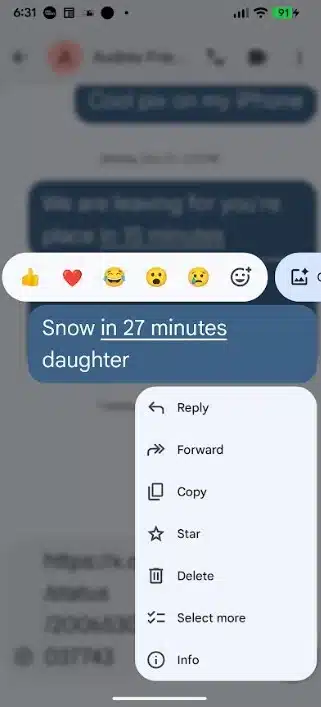
What makes it useful is that it is dynamic — the options change depending on the type of message you select. For example, if you long-press an image, the menu will display the Save option. This makes not only the menu short but also easy to use, while still offering all the necessary options. More importantly, it eliminates the need to stretch your fingers to reach the hamburger menu in the top-right corner of the screen.
While some beta testers think this move removes the ability to delete multiple messages at once, that is not the case. The option is still there, but it works differently now. To delete multiple messages, you first long-press the message you want to remove.
Now tap Select more from the vertical menu. This allows you to tap any additional messages you want to delete. The top-left corner of the screen will show the number of selected messages. After selecting all the messages, tap the trash icon to remove them. We’ll let you know when the dynamic context menu hits the stable channel.

Written by
Binay KonwarBinay Konwar started his blogging journey in 2014 and has since written plenty of tech articles. At present, he is working as a News Writer at SammyGuru, covering everything about Samsung. He holds a Master's degree in Mathematics, but his real passion lies in tech and writing. In his free time, he enjoys playing chess and watching movies.

Follow us on Google Discover & set us as a preferred source in Google News
Share this Post
___________________________


New Blog Posts
___________________________

First Set of Pixel 11 Pro XL Renders Are Here
Pixel 11 Pro XL CAD renders show minimal design changes

Is Samsung Preparing One UI 8.5 Beta for Galaxy Z Fold 5 and Flip 5?
Samsung may launch a One UI 8.5 beta program for its 2023 foldables

Galaxy S25 One UI 8.5 Beta May Run Longer Than Expected
Galaxy S25 series’ One UI 8.5 beta may stretch to 10 rounds







