
Google Chrome Now Rolling Out Bottom Address Bar on Android
SammyGuru is reader-supported. We have affiliate and sponsored partnerships, so we may earn a commission when you buy through links on our site — at no extra cost to you. Learn more.
Even though it’s not a universal problem, as smartphones have become bigger and bigger, it’s not easy to reach all the corners. A Google Chrome update now rolling out will finally fix this. Google is more widely rolling out the bottom address bar for Chrome on Android, which comes a long time after the feature first debuted on iOS.
You can now place Chrome’s address bar to the top or bottom, however you like
If you use Samsung Internet, you might already be familiar with how nifty a bottom address bar can be. Moving the address bar to the bottom makes it easier to type in a website or switch tabs using just your thumb. It may seem like a small update, but it can make a big difference when browsing every day.
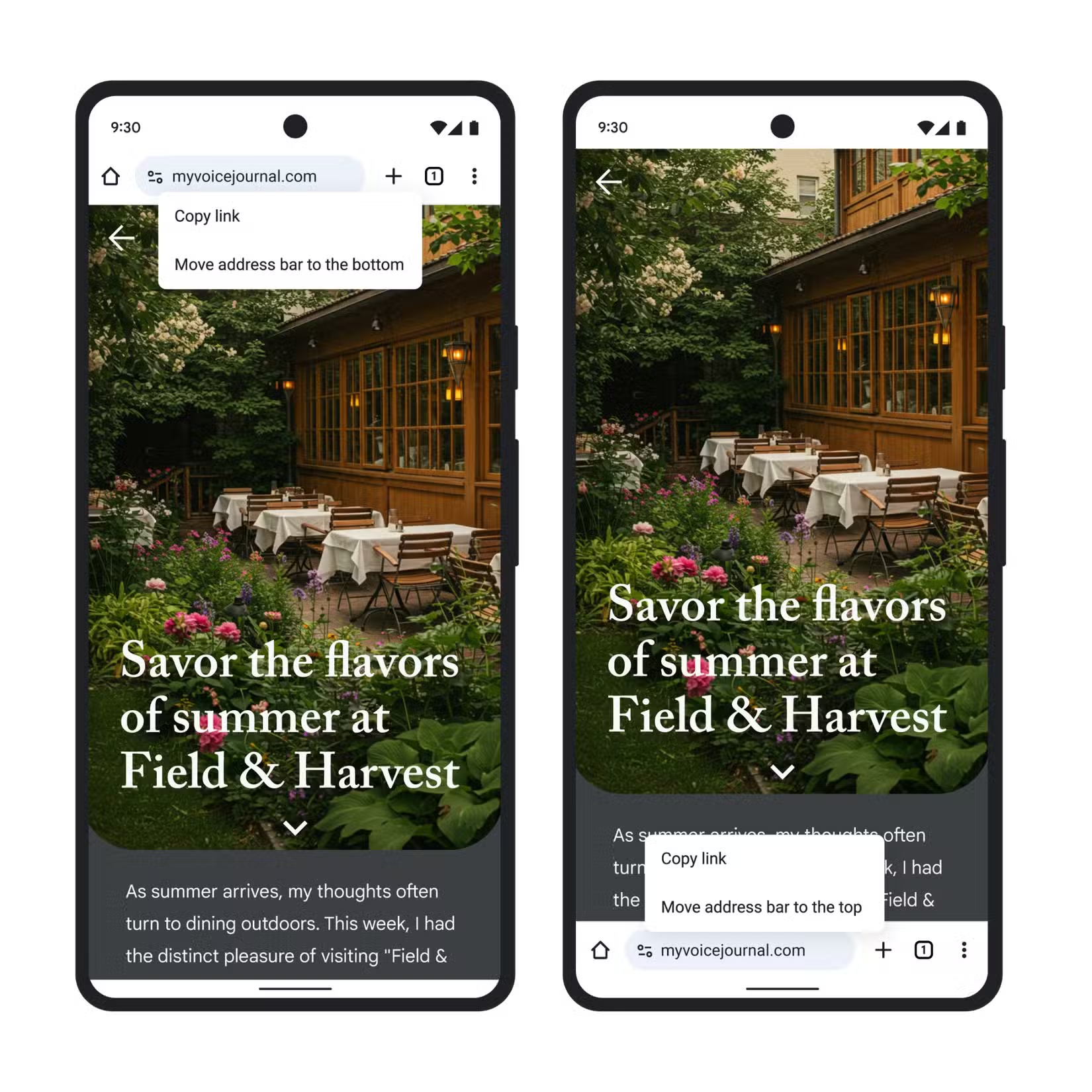
A few months ago, we first learned that Google had begun rolling out the bottom address bar on Chrome for Android. However, back then, it wasn’t as widespread as it is now. Now, you can update your Google Chrome app on Android and experience the bottom address bar.
But what if you don’t want it at all? Well, the feature is optional. If you like the address bar at the top, you can keep it there. Google is not forcing the change. It’s simply offering a new option for people who want a more comfortable layout. That’s great if you’re used to the top layout, but I’d personally suggest giving the change a try. It will take you merely a few days to adapt.
You can move the address bar to the bottom in Google Chrome by long-pressing the address bar. Next, you’ll need to select “Move address bar to bottom.” Alternatively, you can go to Chrome Settings and look for an “Address Bar” section. The update is rolling out in stages. Some people may already see the new option, while others might need to wait a little longer. If you don’t see it yet, check again in a few days.

Written by
Abhinav AnandAbhinav Anand is the News Editor at SammyGuru and a technology journalist based in New Delhi. Before joining SammyGuru, he contributed to numerous outlets, including Android Headlines, ExtremeTech, The Mac Observer, Financial Express, Economic Times, iGeeksBlog, KnowTechie, PhonesWiki, SlashGear, and more. You can reach him at abhinav@sammyguru.com.

Follow us on Google Discover & set us as a preferred source in Google News
Share this Post
___________________________


New Blog Posts
___________________________

First Set of Pixel 11 Pro XL Renders Are Here
Pixel 11 Pro XL CAD renders show minimal design changes

Is Samsung Preparing One UI 8.5 Beta for Galaxy Z Fold 5 and Flip 5?
Samsung may launch a One UI 8.5 beta program for its 2023 foldables

Galaxy S25 One UI 8.5 Beta May Run Longer Than Expected
Galaxy S25 series’ One UI 8.5 beta may stretch to 10 rounds







