
Galaxy S26 Ultra Users Will Need to Relearn This One S Pen Habit
SammyGuru is reader-supported. We have affiliate and sponsored partnerships, so we may earn a commission when you buy through links on our site — at no extra cost to you. Learn more.
If you have been keeping up with Galaxy S26 Ultra leaks, you must be aware of Samsung’s design shift. The new Ultra has a camera bump on the back and more rounded corners than before. This redesign may look subtle at first glance, but for long-time Ultra users, it introduces a surprisingly noticeable change, especially when it comes to the S Pen.
If you plan to buy the Galaxy S26 series, our Mystery Box program is now live. You can sign up here to be eligible for free accessories during pre-orders, including a 65W charger, protective case, and more. (US only)
Galaxy S26 Ultra’s rounded corners change how you insert the S Pen
On previous Ultra models, the S Pen featured a flat, clicky head. As long as you inserted the tip first, orientation didn’t really matter. The pen would sit perfectly flush regardless of how the stylus was aligned. That’s no longer the case with the Galaxy S26 Ultra. Due to a more rounded chassis, the S Pen’s head has also been redesigned. Instead of a uniformly flat top, the new S Pen appears slightly rounded on one side and flatter on the other to match the phone’s curved corner.
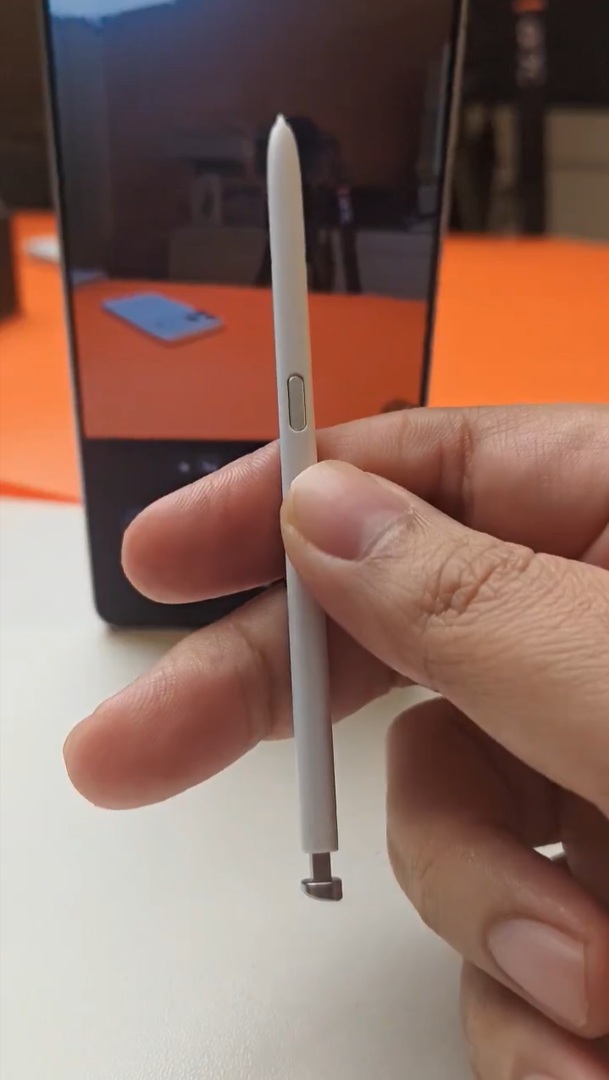
This means you now need to insert the S Pen in a specific orientation:
- The rounded portion of the S Pen’s head must face the phone’s curved corner
- The flatter side must align with the main frame
If inserted the other way around, the S Pen still slides into the silo and doesn’t break. As shown by @KaroulSahil on X, it doesn’t fall out either.
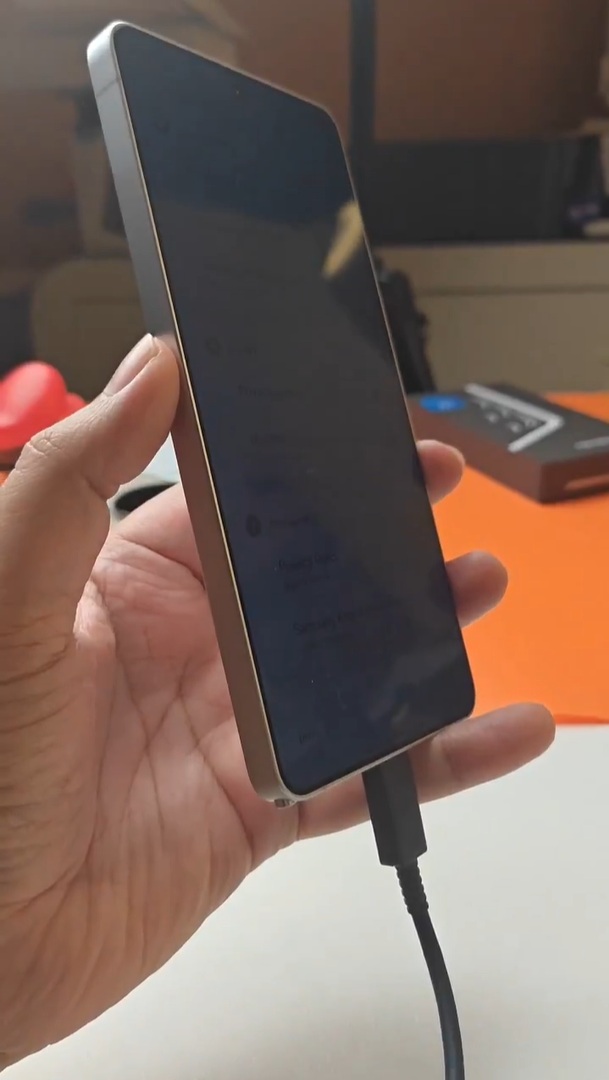
However, as you can see above, the flatter portion awkwardly protrudes slightly beyond the frame, making the misalignment immediately noticeable. When inserted correctly, the stylus sits perfectly flush with the body. It’s a small but meaningful adjustment that could take some time getting used to, particularly for long-time Ultra users.
Last tweet I put the Spen wrongly , as in my S25u I never cared for that both sides were okay so here again pic.twitter.com/adrxFORx2a
— Sahil Karoul (@KaroulSahil) February 22, 2026
No Bluetooth features — as expected
The same source also confirms that the Galaxy S26 Ultra’s S Pen lacks Bluetooth functionality, though this doesn’t come as a surprise. Samsung already removed Bluetooth-based Air Actions and remote control features starting with the S25 Ultra, citing extremely low usage among customers. The S26 Ultra simply continues that approach.
For those who primarily use the S Pen for writing, sketching, annotating, and precision tasks, the experience remains unchanged. But users who relied on gesture controls or remote camera shutter features will once again find those capabilities absent. More specifically, users upgrading from the Galaxy S24 Ultra or older Ultra models need to be wary about it, as those models featured a Bluetooth S Pen.

Written by
Sumit AdhikariSumit, a life-long Samsung user, is passionate about technology and has been professionally writing on tech since 2017. He’s a mathematics graduate by education and enjoys teaching basic mathematics tricks to school kids in his spare time. Sumit believes in artificial intelligence and dreams of a fully open, intelligent and connected world.

Follow us on Google Discover & set us as a preferred source in Google News
Share this Post
___________________________


New Blog Posts
___________________________

First Set of Pixel 11 Pro XL Renders Are Here
Pixel 11 Pro XL CAD renders show minimal design changes

Is Samsung Preparing One UI 8.5 Beta for Galaxy Z Fold 5 and Flip 5?
Samsung may launch a One UI 8.5 beta program for its 2023 foldables

Galaxy S25 One UI 8.5 Beta May Run Longer Than Expected
Galaxy S25 series’ One UI 8.5 beta may stretch to 10 rounds







