
Galaxy A56 Review: Premium Experience with Smart AI Features
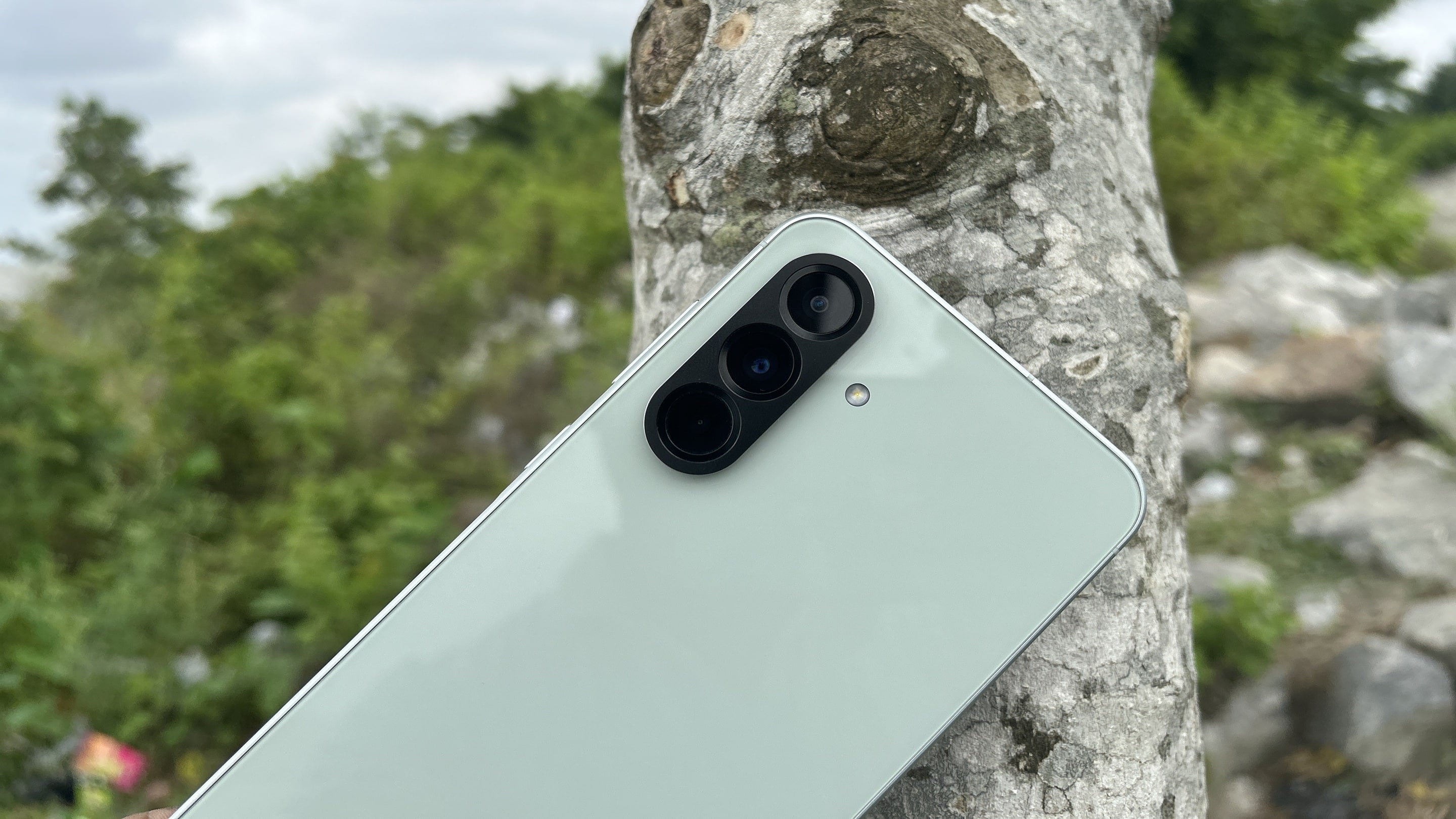
I have been using Samsung’s latest Galaxy A56 for quite some time, and I must say — this is the company’s best premium mid-range offering to date. Its design and solid build quality will definitely attract you. Thanks to the upgraded processor, decent camera, and meaningful AI features, the phone delivers a well-rounded experience for its price. In this review, I’ll share my experience with the Galaxy A56, so you can make an informed decision whether to pick it.
Samsung’s Galaxy A lineup earns a reputation from consumers globally, thanks to a balance of features and affordability. The A5x series has proven to deliver a premium experience with near-flagship-level features for under $500, and the latest Galaxy A56 is no exception. Before you dive into the detailed review, here’s a summary of what I like and what I don’t.
What I like:
- Excellent build quality with a premium finish
- A larger display gives a more immersive viewing experience
- Reliable performance even during heavy tasks
- The primary camera captures amazing shots
- Longer software support
- 45W charging tops up the device quickly
- It packs a few flagship AI features
- Battery life is pretty impressive
What I don’t like:
- It lacks a microSD card slot
- Thicker bottom bezel
- Missing telephoto (zoom) camera
- Ultrawide camera struggles in low light
- Not suitable for one-handed use (subjective)
Table of contents
Disclaimer: I used the Galaxy A56 (8GB+128GB model) as a daily driver for over a month before writing this review. Samsung had no involvement in the creation of this review and did not see the review before it went live on this site. My findings and opinions are entirely independent.
Galaxy A56 Review: Design and Build
I chose the Awesome Olive color variant, and I am happy with my decision. The color gives off a slight green vibe, but it’s not too bright. Honestly, when I picked up the Galaxy A56 for the first time, it felt like a premium device. That’s because Samsung refreshed the design with an enhanced build quality compared to previous generations.
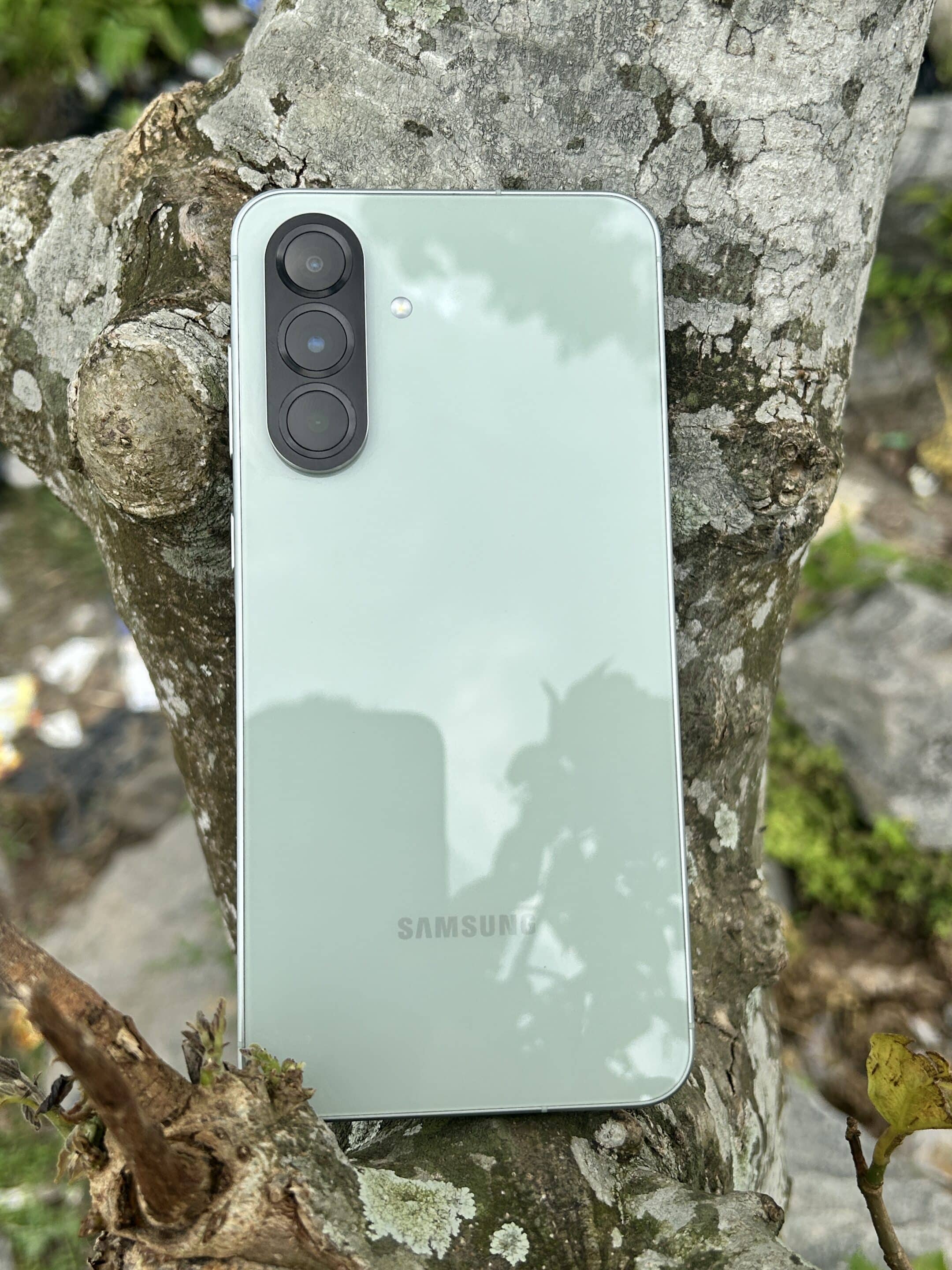
The phone adopts the familiar rectangular slab design, but with rounded corners on both the display and body. I am a fan of this design — not only is it more protective against slips on the edges, but videos and photos also appear undistorted on a flat screen.
Thanks to the implementation of Corning Gorilla Glass Victus+ on both the front and back of the device, we get a much more durable and refined feel. Furthermore, the aluminum frame with a brushed shiny finish makes it enduring and gives it a premium look. The IP67 rating ensures the phone is dust and water-resistant (up to 1 meter for 30 minutes).
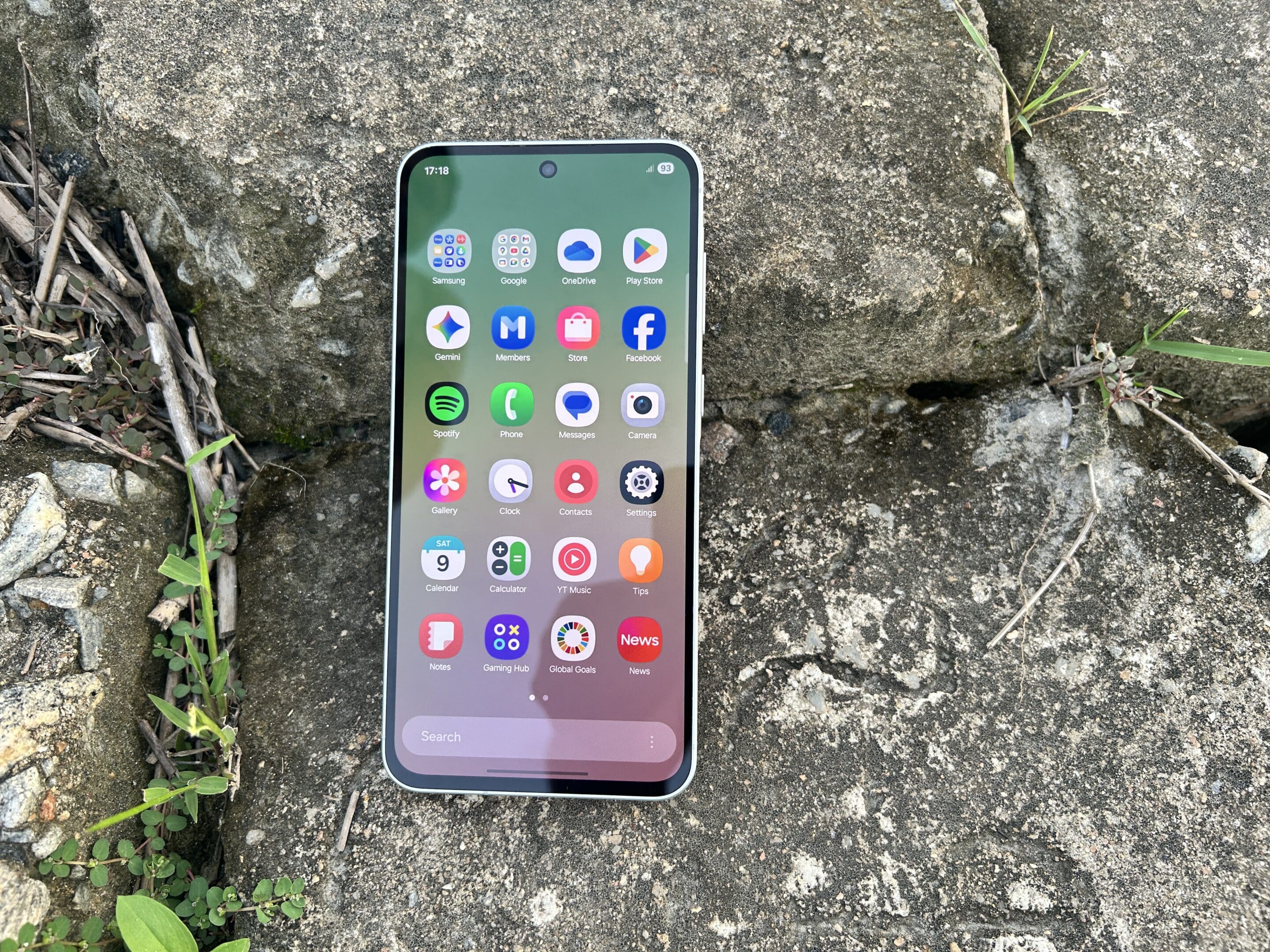
Samsung has reduced the thickness of the device to 7.4 mm from the 8.2 mm seen in its predecessor. This also results in a slight weight drop, from 213g to 198g. The slimmer and lighter profile gives it an elegant feel in the hand and improves the overall aesthetic.
On the right side, the frame features an elevated section called “Key Island,” which houses the power button and volume rockers. The best part is that it doesn’t interfere with the grip — in fact, it provides a comfortable hold and makes it easier to identify the buttons.
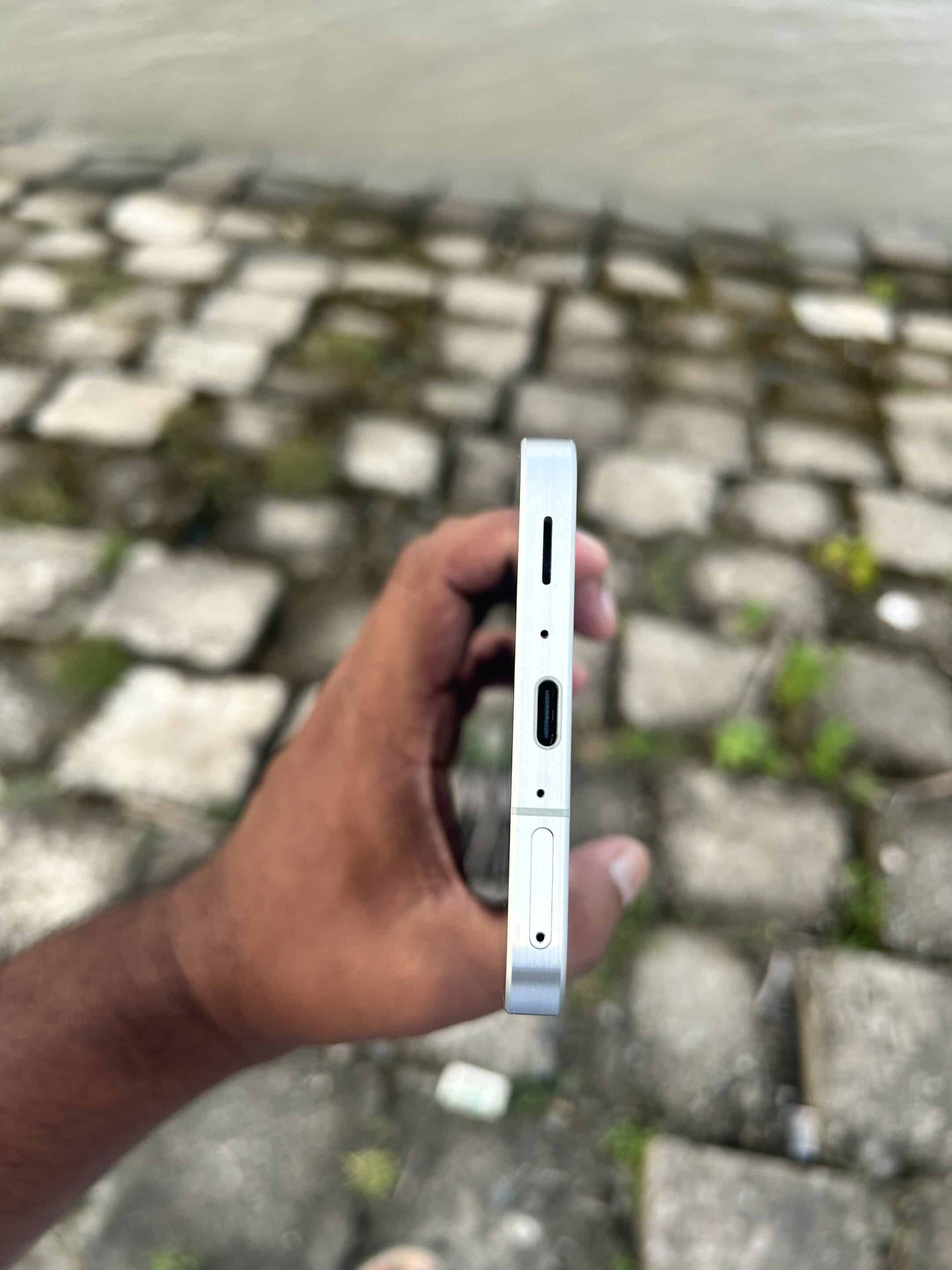
The bottom of the device features a USB Type-C port, main microphone, loudspeaker grille, and SIM card tray. On top, you get a secondary microphone, while the left side is empty. However, I am disappointed because of the removal of the microSD card slot within the SIM tray.
No microSD card slot
Unlike the Galaxy A55, where users could use either a second SIM or a microSD card, the latest model doesn’t offer that flexibility. This is something buyers should keep in mind if they rely on external storage. Perhaps this is a strategic move to push users toward the higher-end storage variant.
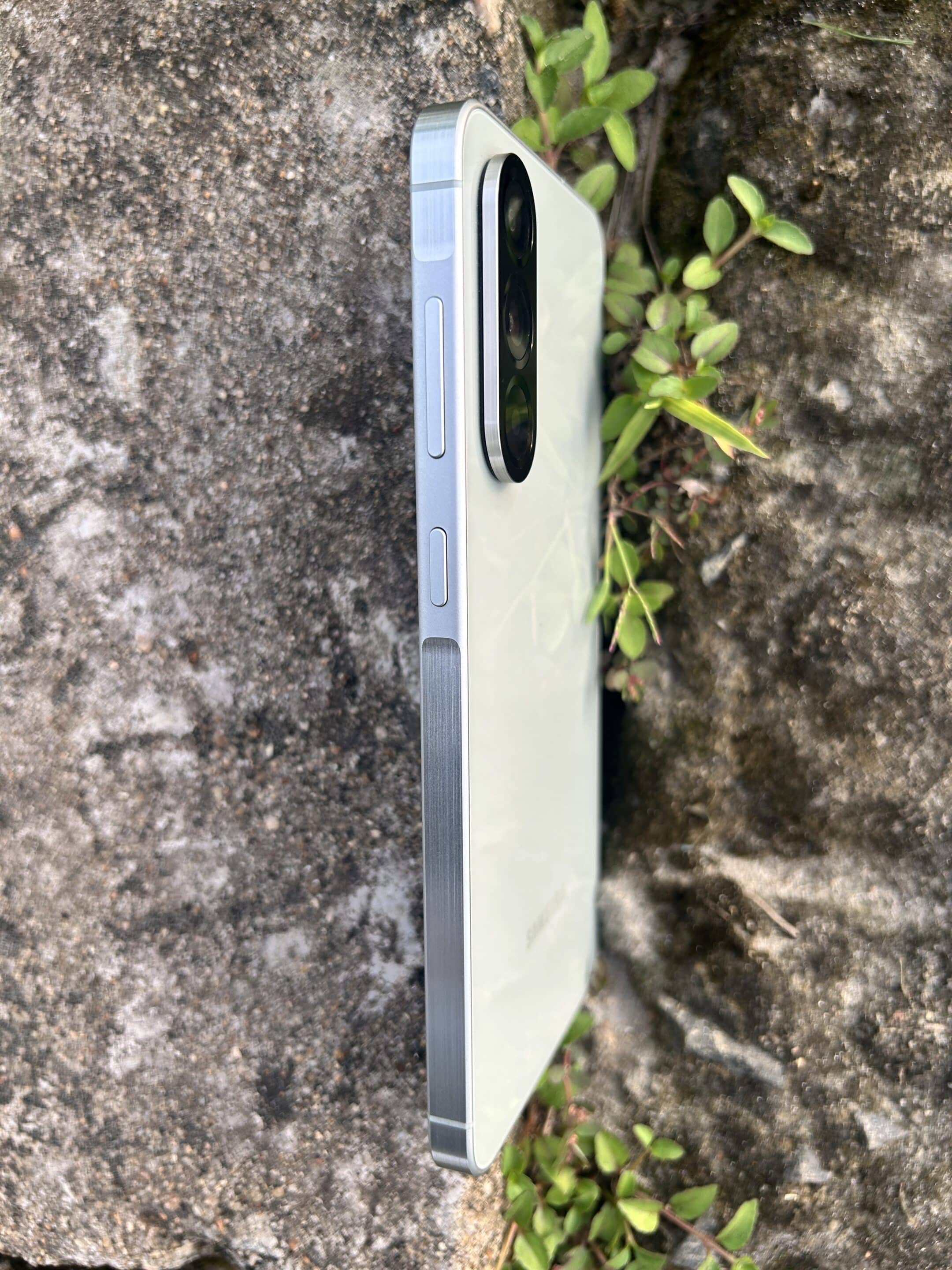
Speaking of major design changes, Samsung has now introduced a large pill-shaped camera bump on the rear side. This camera island houses the three lenses in a vertical setup, marking a departure from the individual camera ring design seen on the previous two generations — the Galaxy A55 and Galaxy A54.
I love this change as it surrounds the lens with a raised layout for better protection while giving the phone a modern look. That said, the bump is pretty large, and when placed on a flat surface, the phone slightly jiggles due to the uneven rear profile. This might be because of the slimmer body design, which leaves less space to set up the camera module without a noticeable bump.
Thinner bezels would have enhanced its look
Speaking of bezels, they are noticeably thicker, mainly the large chin. While other brands are reducing bezels in their mid-range offering, Samsung still sticks to the outdated look. Samsung could have at least made the bottom bezel the same size as the top bezel — this would definitely look better. The good thing is that it doesn’t affect the viewing experience, thanks to the large AMOLED display.
It features a small circular cut-out in the display for its selfie camera, which looks better compared to traditional notches. The Galaxy A56 measures 162.2 mm in height, 77.5 mm in width, and has a 6.7-inch screen. This makes it a large phone, which may not be ideal for many consumers. Personally, I prefer compact phones — when I first used this device, I really struggled to operate it with one hand. If you are planning to switch from a compact phone, this is something to keep in mind. When I reach the top of the screen with my thumb to pull down the notification panel, it increases the risk of dropping the phone.
Galaxy A56 Review: Display and Audio
When it comes to display, there is no doubt that Samsung offers impressive screens across its smartphone lineup. Its latest Galaxy A56 features a 6.7-inch Super AMOLED panel that delivers an excellent viewing experience with vibrant colors. Furthermore, HDR10+ and Widevine L1 support ensure you get high-quality streaming on platforms like Netflix and Amazon Prime Video. Thanks to Full HD+ (2340 x 1080 pixels) resolution, you can experience sharp and detailed content.
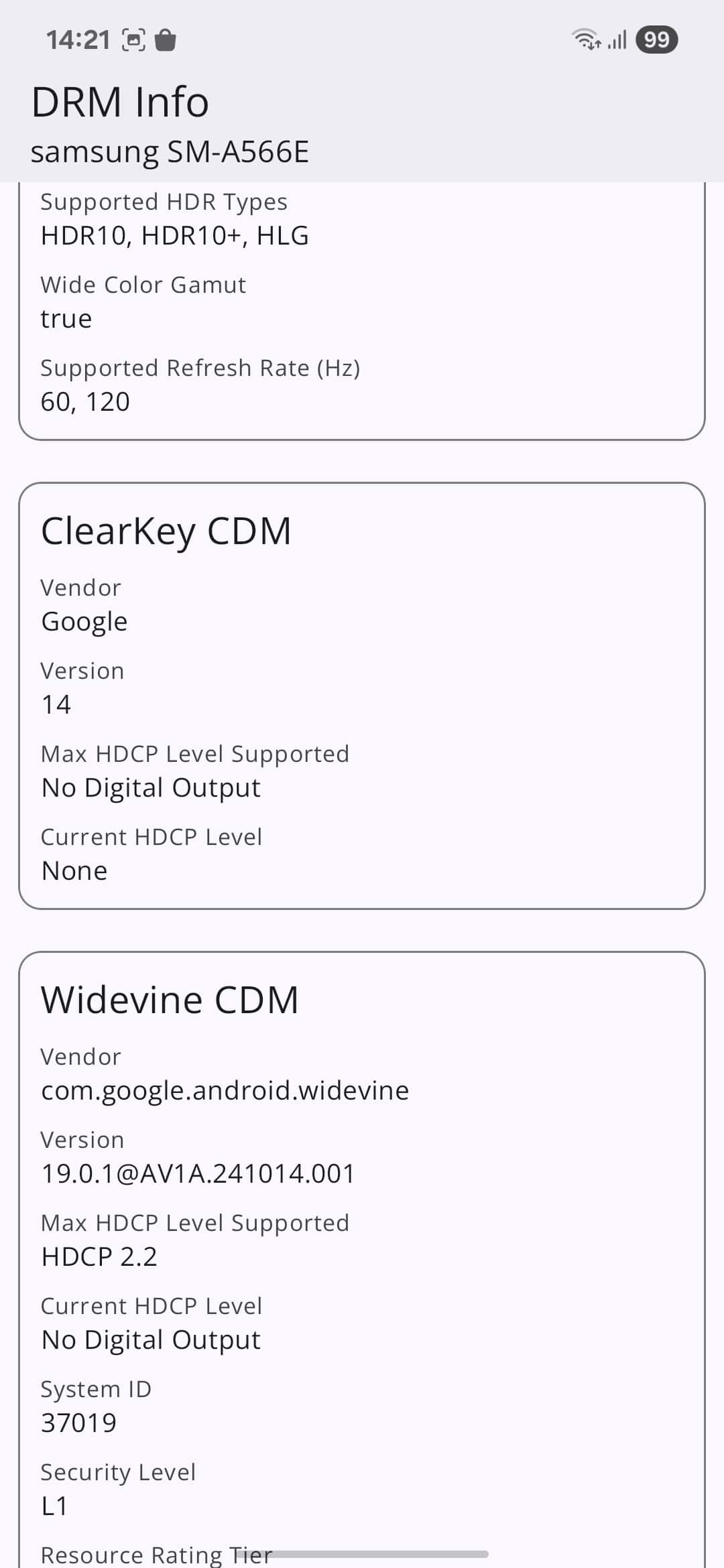
Another notable feature of the panel is its support for a 120Hz refresh rate. This definitely helps in providing a more responsive touch experience as well as smoother scrolling. When I play games or scroll through social media, the display gives a more enjoyable experience. If you want slightly longer battery life, Samsung lets you switch to the standard 60Hz refresh rate, though the difference in smoothness is noticeable.
You also get Samsung’s Vision Booster technology that further enhances the visual experience, which is mainly helpful for those with specific visual needs. This display tech is part of the Adaptive Brightness feature, so make sure to keep it enabled within display settings.
This year, Samsung has made a significant improvement in the display department — the Galaxy A56 offers a peak brightness of 1,200 nits, which is 200 nits brighter than the Galaxy A55’s. This is quite impressive for a mid-range model. During my testing, when I used the phone under direct sunlight, not once did I feel that the screen was hard to see. I think Samsung does a great job in the display segment of the Galaxy A56 for its price.

The optical fingerprint scanner is snappy and well-positioned
To unlock your device, you get an under-display optical fingerprint sensor with a designated area on the screen. The location is perfect — it’s easy to reach quickly, making the unlocking process convenient. While Samsung has reserved ultrasonic sensors for its flagship lineup, the optical sensor on the A56 does the job well. Thanks to the Eye Comfort Shield display feature, it filters blue light to prevent eye strain — you can set it to automatically turn on at your scheduled time.
Speaking of the sound segment, the Galaxy A56 comes with new stereo speakers that support Dolby Atmos. I am impressed with the overall sound quality — it offers a balanced sound without being too overpowering or too flat. Even at peak volumes, I didn’t notice any compromise in quality — audio remained clear. Samsung could have improved the bass a bit, but you won’t be disappointed — you still get an immersive audio experience. You can also personalize the experience when using earphones, thanks to features such as the equalizer, UHQ upscaler, and Adapt Sound.
Galaxy A56 Review: Camera
The Galaxy A56 sports a triple camera setup with a familiar combination of 50MP main, 12MP ultrawide, and 5MP macro lenses. It lets you take photos from close-up to wide shots with great detail. However, since it misses out on a telephoto lens, you have to rely on digital zoom, which doesn’t offer the same clarity as optical zoom.
While the main camera units are similar to the predecessor, Samsung brings an improvement to the selfie camera. It now features a 12MP shooter with a higher-quality sensor, replacing the older 32MP sensor found in the Galaxy A55. Here are the full specs of all four cameras.
- Primary: 50MP camera with 1/1.56-inch Sony IMX906 sensor, f/1.8, PDAF, OIS, and 2160p video recording at 30fps
- Ultrawide: 12MP camera with 1/3.06-inch Sony IMX258 sensor, f/2.2, 123-degree FOV, 1.12µm, and 2160p video recording at 30fps.
- Macro: 5MP camera with f/2.4
- Front: 12MP Samsung S5K3LC sensor with f/2.2 and 2160p video recording at 30fps
Daylight photography
In good lighting conditions, the phone’s main camera captures amazing shots. Thanks to support for OIS, you don’t need to worry about hand shaking during photography. It delivers detailed photos with good dynamic range, balancing bright and dark areas accurately. I am impressed with the color reproduction — photos look natural and avoid oversaturation. Below are a few samples from the main camera:





If you love capturing portrait shots, the Galaxy A56 won’t disappoint you. It does a good job of detecting edges, nicely separating the subject from the background. You can see two portrait shots below:


While you can digitally zoom up to 5X, photos start losing their clarity after 2X zoom, which is the major disadvantage of not having a dedicated optical zoom camera. You can see digital zoom shots below:
-

- 2X zoom (50MP)
-

- 4X zoom (50MP)
The 12MP ultrawide camera also captures fine shots with a great wide field of view. While photos don’t lose color accuracy, you may notice a slight drop in overall sharpness. Check out a few samples from the ultrawide camera:




Speaking of the 5MP macro camera, it comes in handy if you want to get up close to small subjects such as flowers and insects. It captures satisfactory photos with decent detail. You can see macro samples below:


Low-light photos
While my expectations for low-light photography were not high, Samsung proved me wrong with its main camera. Thanks to the wide f/1.8 aperture and OIS, the primary lens can capture brighter and more stable night shots. The camera app automatically triggers Night Mode when it detects poor lighting conditions. You can disable it if you prefer, but with this mode enabled, the results are better — you get improved brightness and reduced noise. Below are a few low-light samples from the primary camera:







Regarding the ultrawide low-light shots, I will say the performance is average. You may notice a grainy texture in darker areas of the image and less dynamic range, which is not surprising. While the lens performs well in daylight, it struggles a lot in low-light conditions because of its smaller aperture. Check out two ultrawide samples in low-light conditions:


Front camera shots
The upgraded 12MP selfie shooter is capable of capturing vibrant photos in good light conditions. It maintains natural skin tones and color with good detail. The camera can balance the exposure and contrast nicely, so the face doesn’t get lost in overexposed light. Portrait mode delivers a pleasant background blur with impressive edge detection. You can see the selfie shooter sample below.


What about videos?
You can record videos from both rear and front cameras at up to 4K at 30fps. You will get clear footage with good color reproduction and dynamic range in daylight. OIS on the main camera works perfectly, helping to stabilize the footage during hand movement.
If you want to create super slow-motion videos like those on the Galaxy S25, Samsung offers a convenient solution — but with a catch. You won’t get the built-in Instant Slow-mo feature on the Galaxy A56. However, you can achieve a similar effect through the Galaxy Enhance-X app, which lets you apply slow-motion effects to your videos after recording.
Galaxy A56 Review: Performance
Even though Samsung attracts consumers with its meaningful features on mid-range smartphones, its in-house Exynos processor discourages some buyers. This is because previous generations — such as the Exynos 990, 2100, and 2200 — had some issues with overheating and throttling, compared to their Snapdragon counterparts.
However, Samsung has made significant improvements to its latest generation chips, and consumers should disregard those perceptions. For example, the Exynos 2400 chip inside the Galaxy S24 has been well-received by many users. While that chip falls into the flagship category, the company’s mid-range processors are also getting the same treatment with each iteration.
The Galaxy A56 features the Exynos 1580, the Korean firm’s latest mid-range chip, paired with up to 12GB of RAM and 256GB of storage. It undoubtedly delivers better power efficiency and thermal management compared to its predecessor, the Exynos 1480, not just on paper, but in real-world performance as well.
Based on a 4nm node, the Exynos 1580 is an octa-core processor with a 1+3+2 CPU configuration. The main single-core Cortex-A720 runs at 2.9 GHz, while the three Cortex-A720 and four Cortex-A520 cores are clocked at 2.6 GHz and 1.95 GHz, respectively. The chip implements a third-gen custom GPU called Xclipse 540, based on AMD’s RDNA 3 architecture.
Samsung says, unlike its predecessor’s one Work Group Processor, it now features two with increased GL2 cache capacity and twice the amount of texture unit processing. This results in up to a 37% maximum performance boost and a 20% under the same power usage conditions as the Exynos 1480.
Benchmark figures
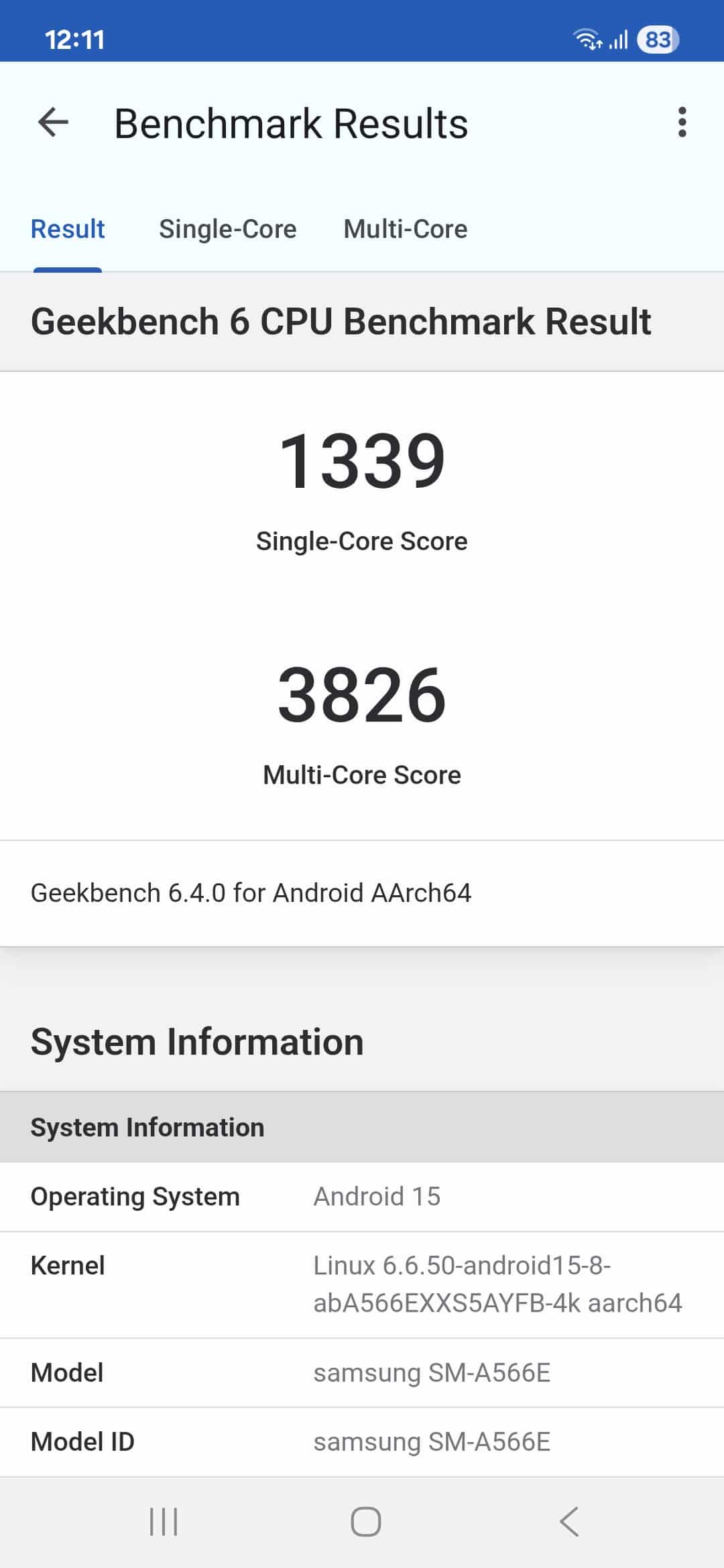
Now, talking about the benchmark test, on the Geekbench 6 platform, the single-core test recorded 1,339 points, while the multi-core test got 3,826 points. In comparison, the Galaxy A55’s Exynos 1480 chip scored 1,147 and 3,360 points, respectively. So theoretically, the new chip can deliver slightly better processing power than the previous generation.
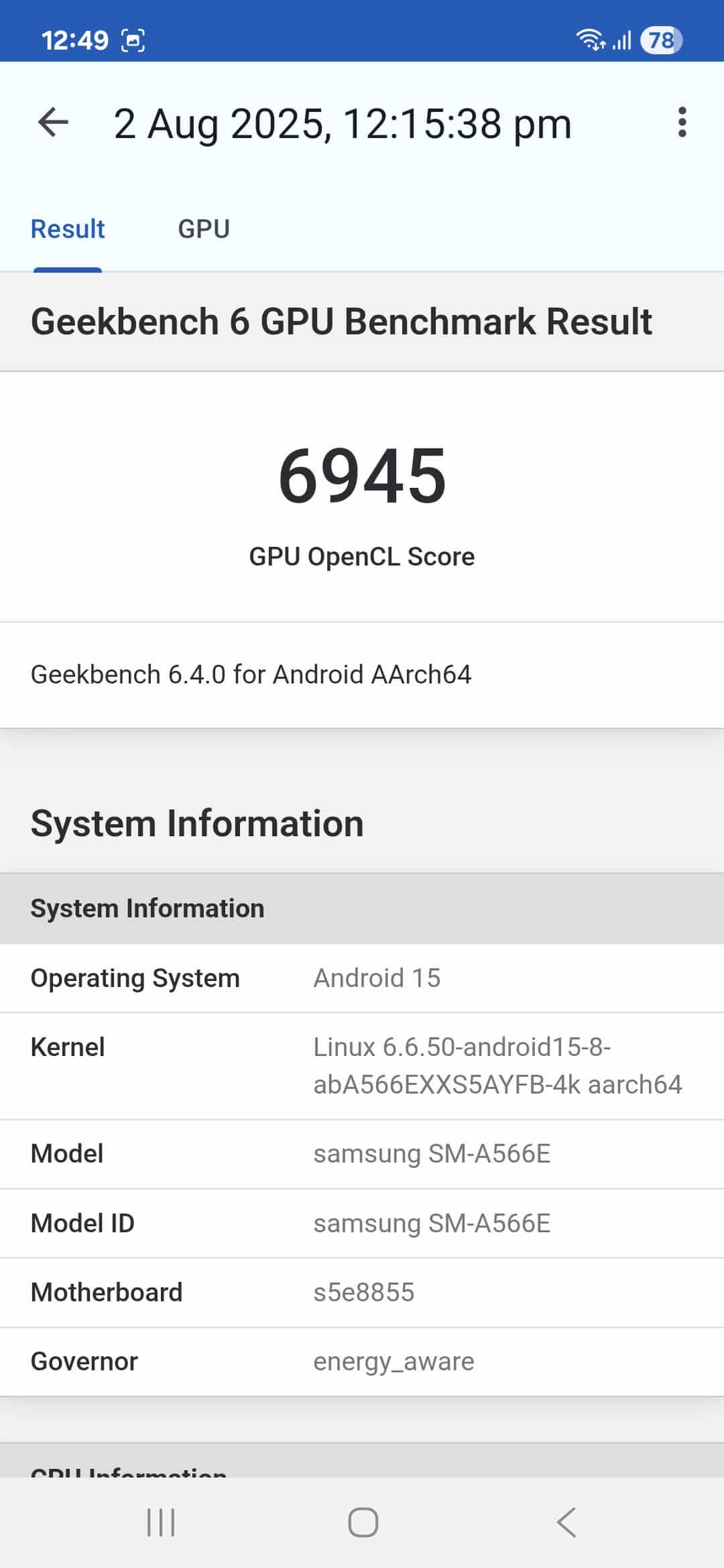
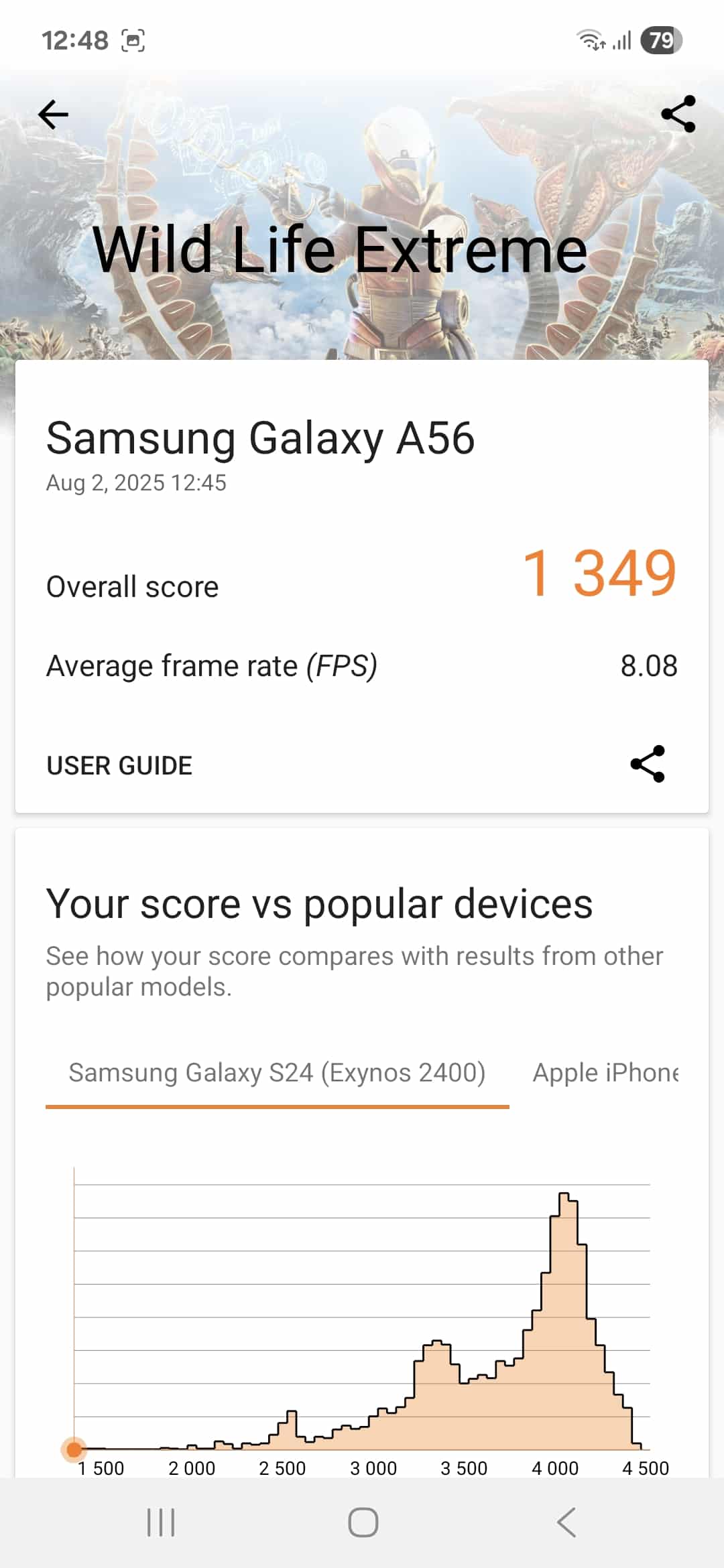
However, the biggest improvement is in the GPU segment, at least on paper. The Galaxy A56 scored 6,945 points, while the A55 achieved only 3,974. The difference is around 75%, highlighting Samsung’s effort in improving graphics performance in the latest chip. On top of that, the device achieved a decent 3D Mark Wildfire Extreme score of 1349 points, which is around 300 points more than the A55.
I used the phone extensively throughout the day — watching movies, using the camera (photo and video), browsing, social media, and more. Not once did I feel the phone could not handle day-to-day tasks. There was no noticeable heat or throttling. However, during an hour of gaming (Call of Duty), the device did warm up slightly, though it stayed comfortable to hold. The best thing is that the phone didn’t show any signs of performance drops.
That said, don’t expect flagship-level gaming performance as it’s a mid-range device. The graphics settings might be reduced in more demanding games. More importantly, if you play the game for a long time, you might experience some throttling as well. Simply put, the phone is perfect for day-to-day use and for those who enjoy casual gaming.
Galaxy A56 Review: Battery and Charging
When it comes to batteries, Samsung is still behind in this segment, as other brands have integrated massive 6,000 mAh batteries into their mid-range devices. The Galaxy A56 comes with a 5,000 mAh battery — the same capacity as the last three generations: the A53, A54, and A55. While the battery capacity remains the same on paper, you can expect improved power efficiency with the new model. This is due to the software optimizations and the implementation of a more efficient chipset.
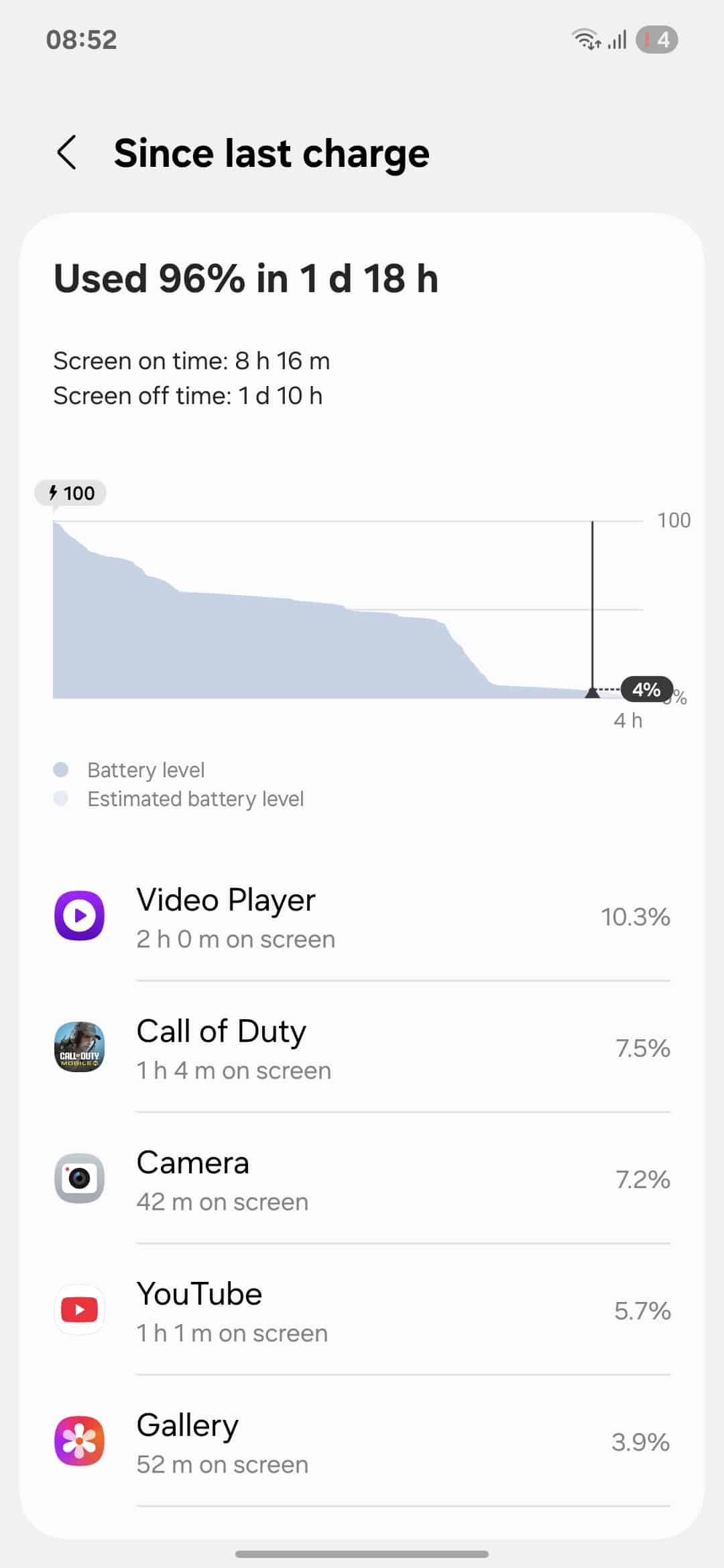
As you can see in the screenshot below, the Galaxy A56 gave more than 8 hours of screen-on time from a full charge down to 4%. That’s a pretty impressive result for a large-screen device — 2 hours of video playback on the default player consumed just 10.3% of the battery, while 1 hour of gaming used about 7.5%.
As for charging speed, the phone now supports 45W fast charging, which is a welcome upgrade. Samsung has finally broken the previous 25W charging limit it had stuck to since the Galaxy A52 in 2021. Unsurprisingly, the company doesn’t include a power brick in the box, meaning you will need to buy it separately.
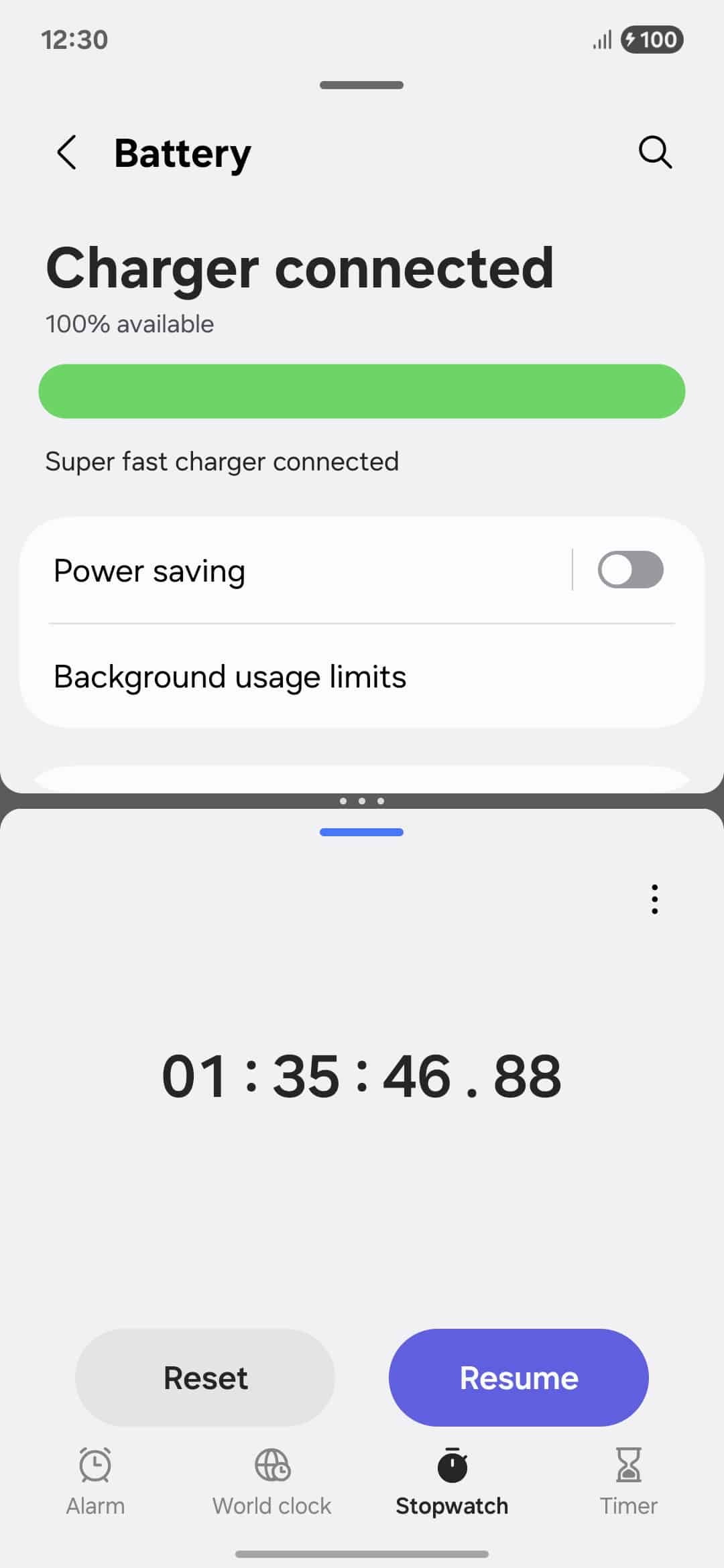
However, if you already have Samsung’s original 25W charger, it still won’t disappoint you. In our test, it took around 1 hour and 35 minutes for the full charge. Of course, if you use a 45W adapter, you will get faster charging times than 25W’s, though the difference is not big.
The Galaxy A56 doesn’t support wireless charging — likely the company’s strategic move to differentiate it from the flagship lineup. While this might slightly let down some consumers, I don’t think it should be a deal-breaker for the wider audience.
Galaxy A56 Review: Software
During device setup, it asks whether you want to install recommended apps — you can skip this step and proceed. Once set up, you will experience a significantly upgraded software over previous generations. Yes, I am talking about Android 15-based One UI 7, which ships out of the box. It brings a redesigned interface, improved responsiveness, more customization options, smoother animations, and lots of AI-driven features.
If you plan to keep your device for a long time, its extended software support policy makes that possible. Samsung offers up to six generations of Android OS upgrades and six years of security updates. In comparison, last year’s Galaxy A55 promised just four major updates, so Samsung is now giving flagship-level treatment to its new mid-range model.
What I like about the new software is the ability to access notifications and quick settings separately. Previously, we only had the unified view, but now Samsung offers more flexibility. To be honest, the separate layout feels much better — I am not switching back to the merged view.
If you want to control ongoing activities, such as music, right from the lock screen, you can now do so. One UI 7’s Now Bar is a small pill-shaped widget that displays live updates from a bunch of apps, including both Samsung’s own and third-party apps. However, some users don’t like the placement of the Now Bar on the Galaxy A56.
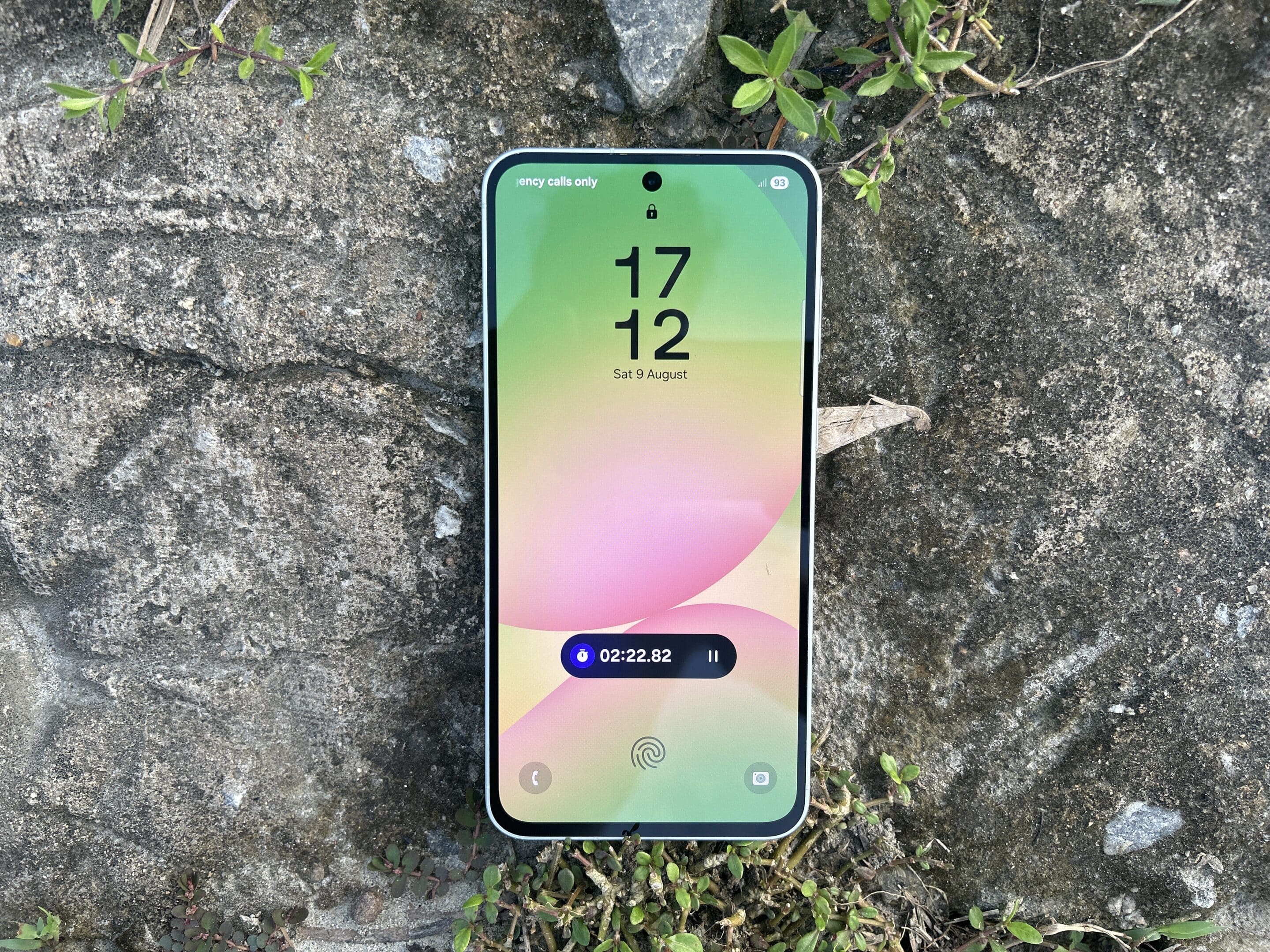
Unlike on flagships, where it sits at the bottom of the screen, it is positioned higher on this mid-range device. Personally, I love the higher placement — it is easier for me to reach. Samsung didn’t do this just to make it different from flagships — it is because of the positioning of the under-display fingerprint scanner.
Game Booster enhances the gaming experience
If you play games, you can take advantage of Game Booster — an advanced feature within the settings page. It lets you customize settings for individual games so you can optimize device performance during gameplay. Another notable feature is RAM Plus. On my device, it was set to 4GB by default, but you can choose higher RAM options as well. This feature basically works as virtual memory to improve app performance.
Samsung also makes software updates easier with its Seamless Updates feature. You no longer need to stop using your device during an update, as everything is installed in the background. Once you are free, you just need to restart the device to complete the process. It doesn’t affect performance at all — you won’t even notice the update is happening. I found it pretty helpful.
Awesome Intelligence brings smart AI features
Samsung has made its Galaxy A56 stand out in the market with its cutting-edge AI features. While you don’t get all the AI capabilities found in the flagship device’s Galaxy AI suite, this mid-range phone still offers meaningful tools that improve day-to-day life. Samsung calls its AI suite for the Galaxy A series “Awesome Intelligence”.
The AI suite includes a bunch of features such as Circle to Search, AI Select, Read Aloud, Object Eraser, Edit Suggestions, Best Face, Auto Trim, and Filters. I am really impressed with all of these — it feels like I am using a flagship phone. My favorite features are Object Eraser and Best Face. You can check out our previous post to learn their functionality in detail.
Speaking of Object Eraser, it lets you remove objects or even people from your photos. As you can see in the screenshots below, I tried to remove the yellow patch stuck onto the hat of the doll. While the tool did erase the patch, it also removed part of the hat’s curved edge. Still, the overall result was quite clean and impressive.


Good Lock support enables extensive customization of UI elements
One of the major benefits of using Galaxy devices is access to a bunch of customization tools. Thanks to Samsung for making its powerful Good Lock suite available globally. The Galaxy A56 supports plenty of modules from the suite, allowing users to personalize their Galaxy experience. For example, LockStar lets you customize the lock screen and AOD, while NavStar helps you organize the navigation bar and gesture mode.
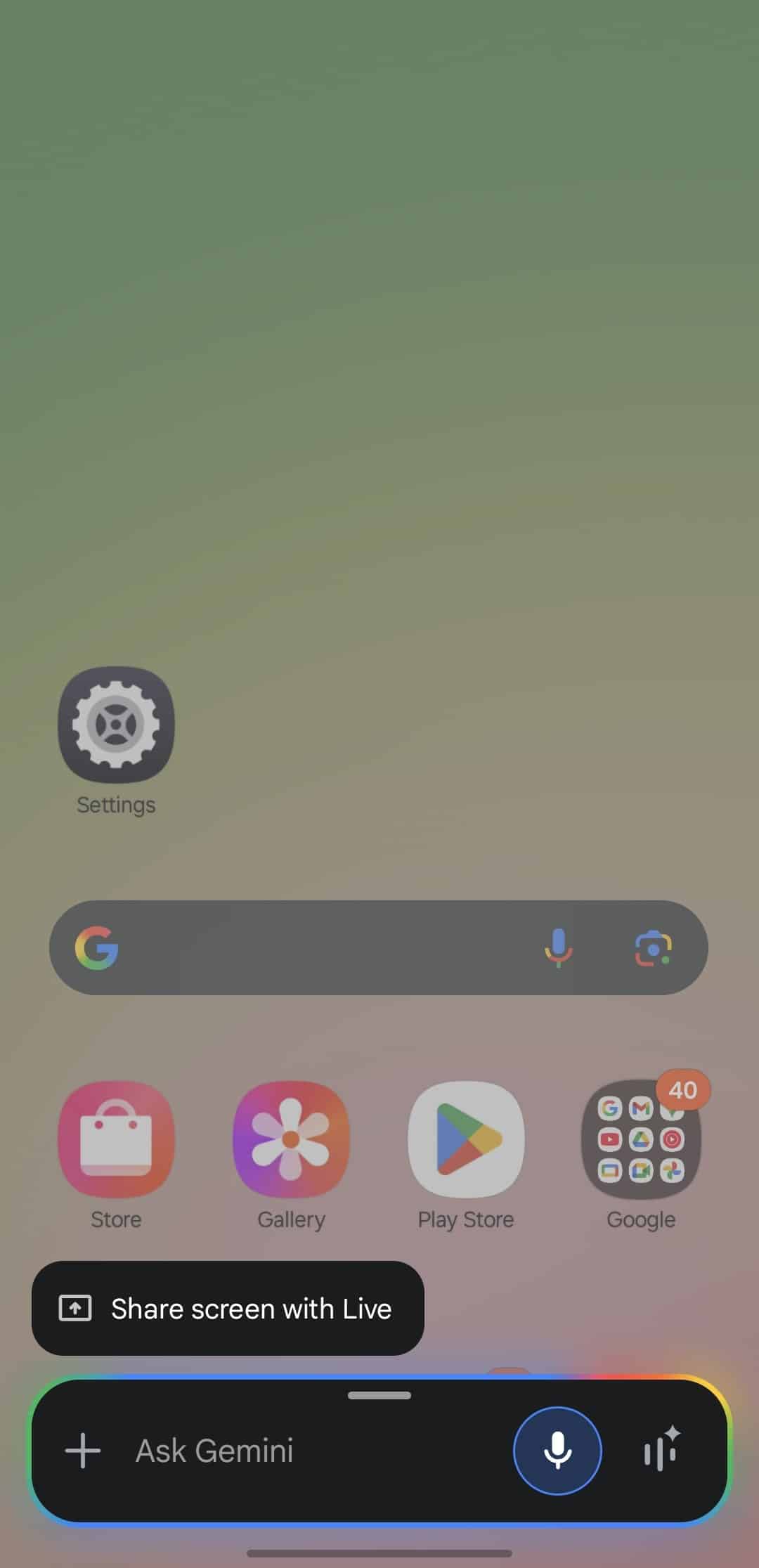
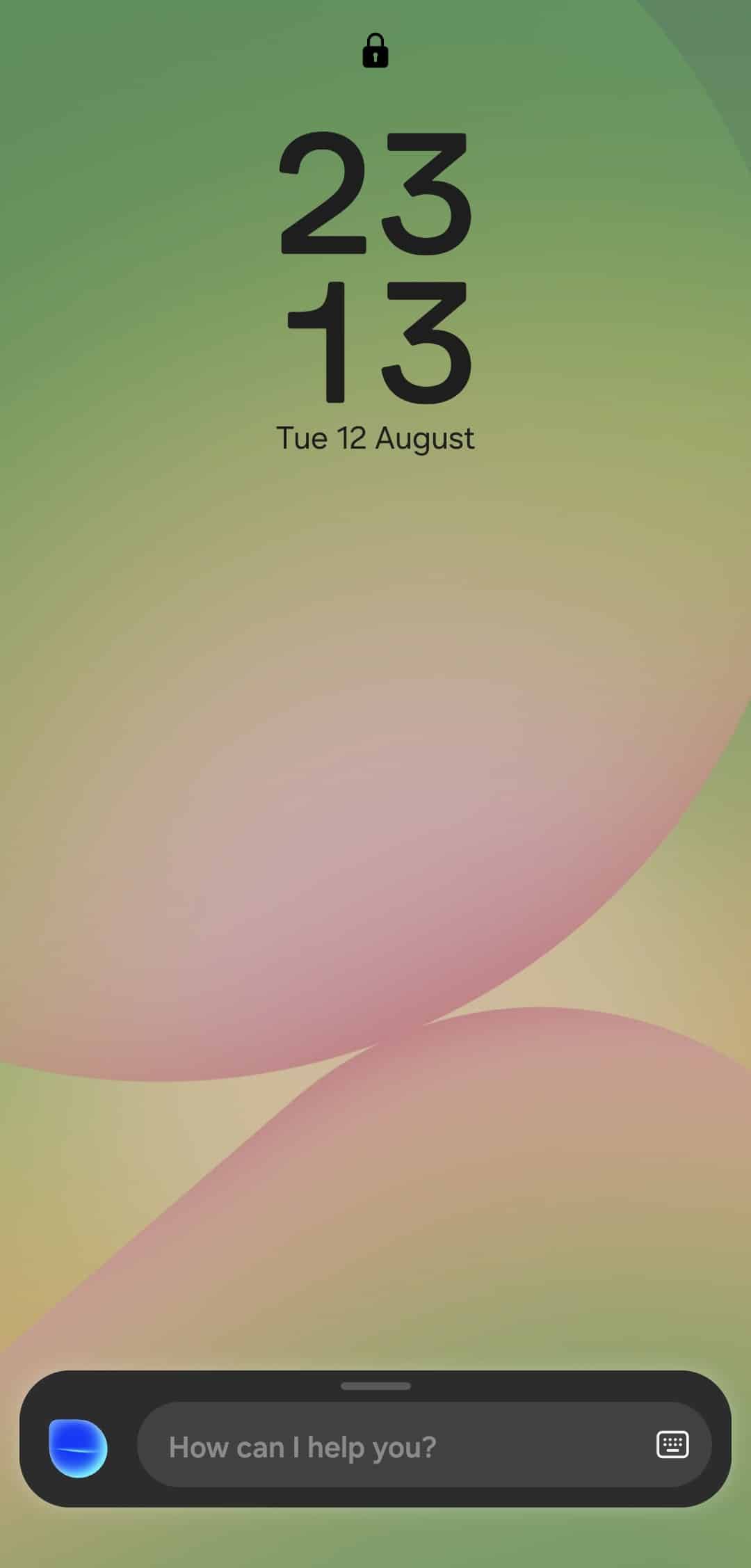
Like the Galaxy S25 series, Samsung also deepened the integration of Google’s Gemini AI assistant on the Galaxy A56. You can now activate it by long-pressing the side power button. I found it super useful, as I can easily ask questions without needing to open the Gemini app. Bixby Assistant is still available — just say Bixby and you can get help with on-device actions.
Galaxy A56 Review: Verdict
Samsung has tried to give its Galaxy A56 users a feature-rich experience with premium build quality. It focuses on the areas that matter most to consumers in day-to-day life. This includes a vibrant AMOLED screen, full-day battery life, decent performance, faster charging, longer software support, and an impressive camera. Furthermore, its Awesome Intelligence suite brings several smart AI features to make everyday tasks easier.
Of course, the phone compromises in some areas, such as the lack of a dedicated zoom lens and the presence of noticeable bezels. However, this is understandable, as Samsung also offers a quasi-flagship option in its Fan Edition (FE) lineup — it offers near flagship-level features without hitting the premium price tag.
Now the question is: Should you invest in the Galaxy A56? In short, yes — the Galaxy A56 excels in the mid-range segment and is a solid pick for most users. Note that it’s not for heavy gaming and might not perform at flagship-level smoothness. So, if gaming is your top priority, I would recommend looking at other options that pack a more powerful processor. The phone is available for purchase on Samsung’s official website with a starting price tag of $499.

Follow us on Google Discover & set us as a preferred source in Google News
Share this Post
___________________________


New Blog Posts
___________________________

First Set of Pixel 11 Pro XL Renders Are Here
Pixel 11 Pro XL CAD renders show minimal design changes

Is Samsung Preparing One UI 8.5 Beta for Galaxy Z Fold 5 and Flip 5?
Samsung may launch a One UI 8.5 beta program for its 2023 foldables

Galaxy S25 One UI 8.5 Beta May Run Longer Than Expected
Galaxy S25 series’ One UI 8.5 beta may stretch to 10 rounds


