
Do This to Fix WhatsApp Error on Your Galaxy Watch
SammyGuru is reader-supported. We have affiliate and sponsored partnerships, so we may earn a commission when you buy through links on our site — at no extra cost to you. Learn more.
If WhatsApp on your Galaxy Watch has stopped working, you are not alone. Several users have reported seeing a full-screen error message saying the app is obsolete. Thankfully, the issue appears to have been fixed with the latest version of the messaging app.
WhatsApp shows an obsolete error for many Wear OS users
Samsung’s Galaxy Watch lets you receive incoming messages on WhatsApp and reply using voice or text. However, earlier this week, several users of Wear OS smartwatches, including Galaxy Watch owners, took to Reddit to complain about an issue with WhatsApp. When users open the app, it displays a message that reads “The version of WhatsApp became obsolete. Please go to the Google Play Store to download the latest version.”
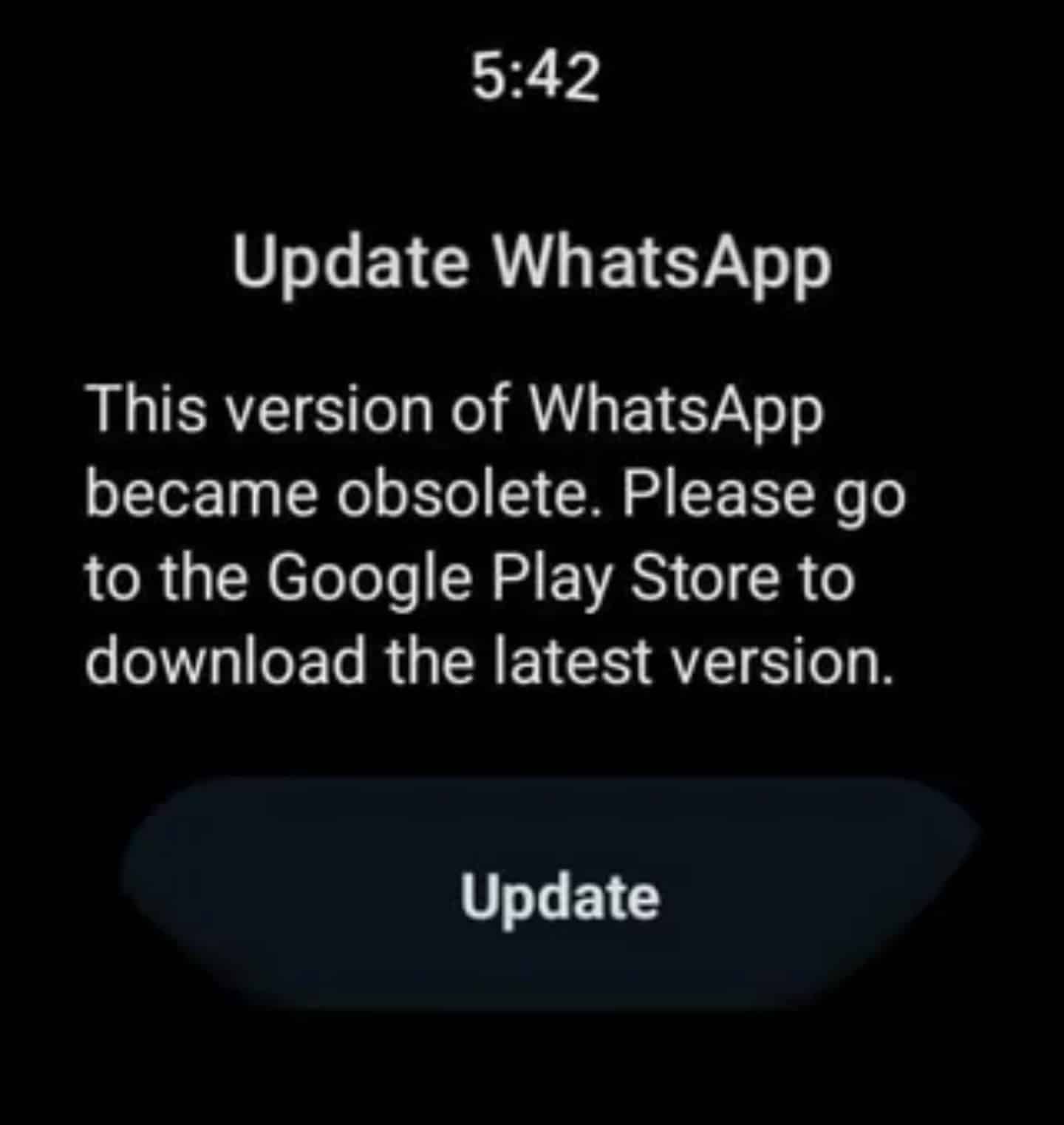
What’s surprising is that some users can still reply to incoming messages through notifications, but they are unable to access chats directly. This frustrated many users who rely on the Galaxy Watch for messaging. According to Android Authority, the issue showed up on multiple Wear OS versions, from 3.5 through 6. So, even if your Galaxy Watch is running the latest software version, you may experience the issue.
Meanwhile, some affected users discovered a few temporary workarounds. If you join the WhatsApp beta program on the Google Play Store or uninstall and reinstall the app while connected to Wi-Fi, you may be able to open the app successfully. However, these methods are not very convenient and may not work for everyone.
Meanwhile, WhatsApp appears to have recently addressed the issue with a new update through the Google Play Store. Several affected users confirmed that the issue is no longer triggered when they open the messaging app on their smartwatch. If you are experiencing the issue, you should update WhatsApp as soon as possible. To do so, open the Play Store app on the watch and go to Manage apps. You should see WhatsApp in the list, where you can proceed with the update.

Written by
Binay KonwarBinay Konwar started his blogging journey in 2014 and has since written plenty of tech articles. At present, he is working as a News Writer at SammyGuru, covering everything about Samsung. He holds a Master's degree in Mathematics, but his real passion lies in tech and writing. In his free time, he enjoys playing chess and watching movies.

Follow us on Google Discover & set us as a preferred source in Google News
Share this Post
___________________________


New Blog Posts
___________________________

First Set of Pixel 11 Pro XL Renders Are Here
Pixel 11 Pro XL CAD renders show minimal design changes

Is Samsung Preparing One UI 8.5 Beta for Galaxy Z Fold 5 and Flip 5?
Samsung may launch a One UI 8.5 beta program for its 2023 foldables

Galaxy S25 One UI 8.5 Beta May Run Longer Than Expected
Galaxy S25 series’ One UI 8.5 beta may stretch to 10 rounds







