
Google Play Store Now Warns Users About Apps That Drain Too Much Battery
SammyGuru is reader-supported. We have affiliate and sponsored partnerships, so we may earn a commission when you buy through links on our site — at no extra cost to you. Learn more.
How do you actually figure out which apps are consuming excess battery on your phone? There are a couple of ways to do it, and one of the simplest is to head to Settings > Battery and look for power-hungry apps. But Google has finally come up with a much better solution that will tell you which apps use more battery right on the Play Store itself.
Google Play Store slaps warning label on apps that love draining your battery
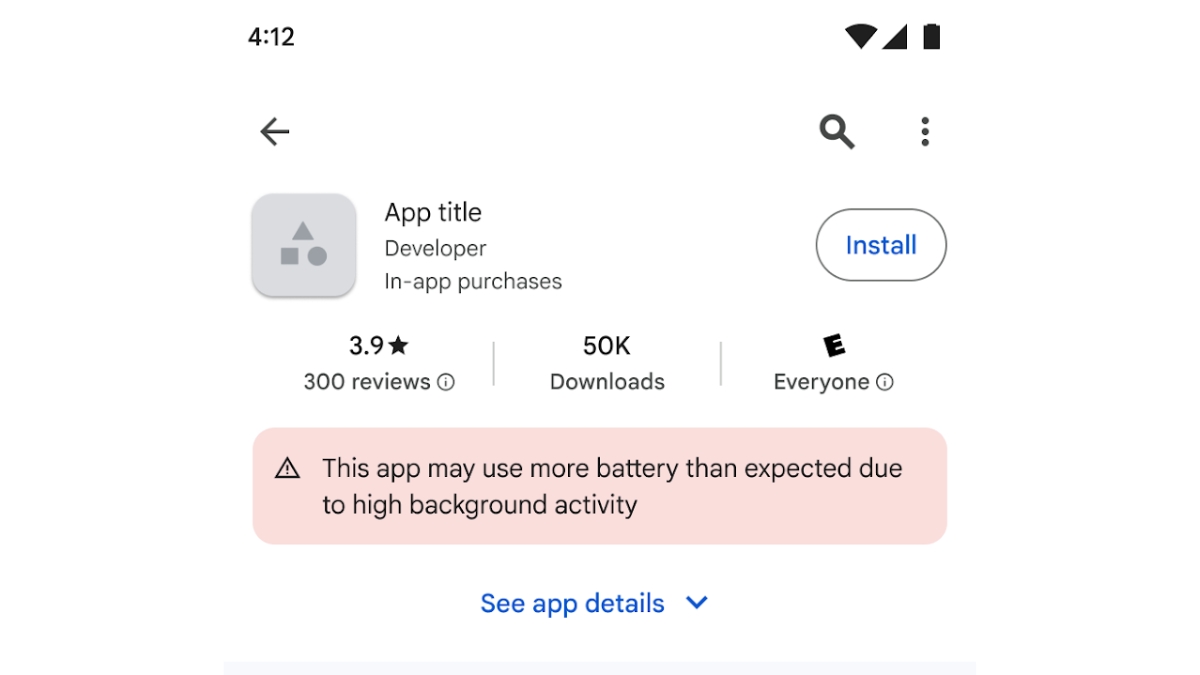
Announced last year, Google is now rolling out warnings in the Play Store under apps that might drain your battery excessively. In a screenshot shared by Google, apps with such behavior have a warning attached. You’ll see a warning appears before you attempt to install them. “This app may use more battery than expected due to high background activity,” it reads.
The warning is tied to Android’s “Excessive Partial Wake Lock” threshold, a metric tracked through Android vitals. Partial wake locks allow apps to keep a phone’s CPU active even when the screen is off, and the user isn’t actively interacting with the app. While this capability is often necessary for some features, excessive use can lead to significant battery drain.
Google considers an app problematic if it holds a non-exempt partial wake lock for at least two hours on average while the screen is off in more than 5 percent of user sessions over a 28-day period. Apps that repeatedly cross this threshold may receive a warning label on their Play Store listing. And well that will give you one reason to not install that.
The company says the initiative is meant to benefit both users and developers. For consumers, the warning provides more transparency about apps that may negatively affect battery life. Over time, this could also lead to better optimized apps across the Android ecosystem. So, have you seen this roll to your device yet? If not yet, it will probably take a few days (or even weeks) as these updates are often gradual.

Written by
Abhinav AnandAbhinav Anand is the News Editor at SammyGuru and a technology journalist based in New Delhi. Before joining SammyGuru, he contributed to numerous outlets, including Android Headlines, ExtremeTech, The Mac Observer, Financial Express, Economic Times, iGeeksBlog, KnowTechie, PhonesWiki, SlashGear, and more. You can reach him at abhinav@sammyguru.com.

Follow us on Google Discover & set us as a preferred source in Google News
Share this Post
___________________________


New Blog Posts
___________________________

First Set of Pixel 11 Pro XL Renders Are Here
Pixel 11 Pro XL CAD renders show minimal design changes

Is Samsung Preparing One UI 8.5 Beta for Galaxy Z Fold 5 and Flip 5?
Samsung may launch a One UI 8.5 beta program for its 2023 foldables

Galaxy S25 One UI 8.5 Beta May Run Longer Than Expected
Galaxy S25 series’ One UI 8.5 beta may stretch to 10 rounds







