
Galaxy S26 Ultra Hands-On: Thinner, Smarter and Surprisingly Ambitious
SammyGuru is reader-supported. We have affiliate and sponsored partnerships, so we may earn a commission when you buy through links on our site — at no extra cost to you. Learn more.
In this article
- Galaxy S26 Ultra Design: The Weight Loss Matters
- Galaxy S26 Ultra Colors: Dynamic and Surprisingly Expressive
- Galaxy S26 Ultra S Pen Changes: Small but Noticeable
- Galaxy S26 Ultra Privacy Display: The Headline Feature
- Galaxy S26 Ultra Display Upgrades Beyond Privacy
- Galaxy S26 Ultra Performance and Thermal Improvements
- Galaxy S26 Ultra Charging and Qi2
- Galaxy S26 Ultra Camera: Iterative Hardware, Smarter Software
- Galaxy S26 Ultra Software and Agentic AI
- Galaxy S26 Ultra – Initial Impressions
I spent about 90 minutes with the Galaxy S26 Ultra today during Samsung’s early access media session in San Francisco. This wasn’t a surface-level demo or briefing. We had open access to the devices, full software builds, and time to explore the hardware and AI features in depth.
After that hands-on time, my overall impression is clear: this is not a radical reinvention of the Ultra line, but it is a meaningful refinement, especially in display technology, privacy, AI-driven software, and overall usability.
Pre-order the Galaxy S26 series through our Mystery Box program to receive a bundle of free gifts. Each box includes 65W GaN charger, USB-C wired earbuds, case, screen protector, desktop stand, cleaning kit, screen protector, and a few extra surprises. Shipping is on us (US only). Fill out this verification form to claim your box. Open the link in Chrome, Samsung Internet, or any web browser (not in the Shop Samsung app) to avoid errors.
Galaxy S26 Ultra Design: The Weight Loss Matters
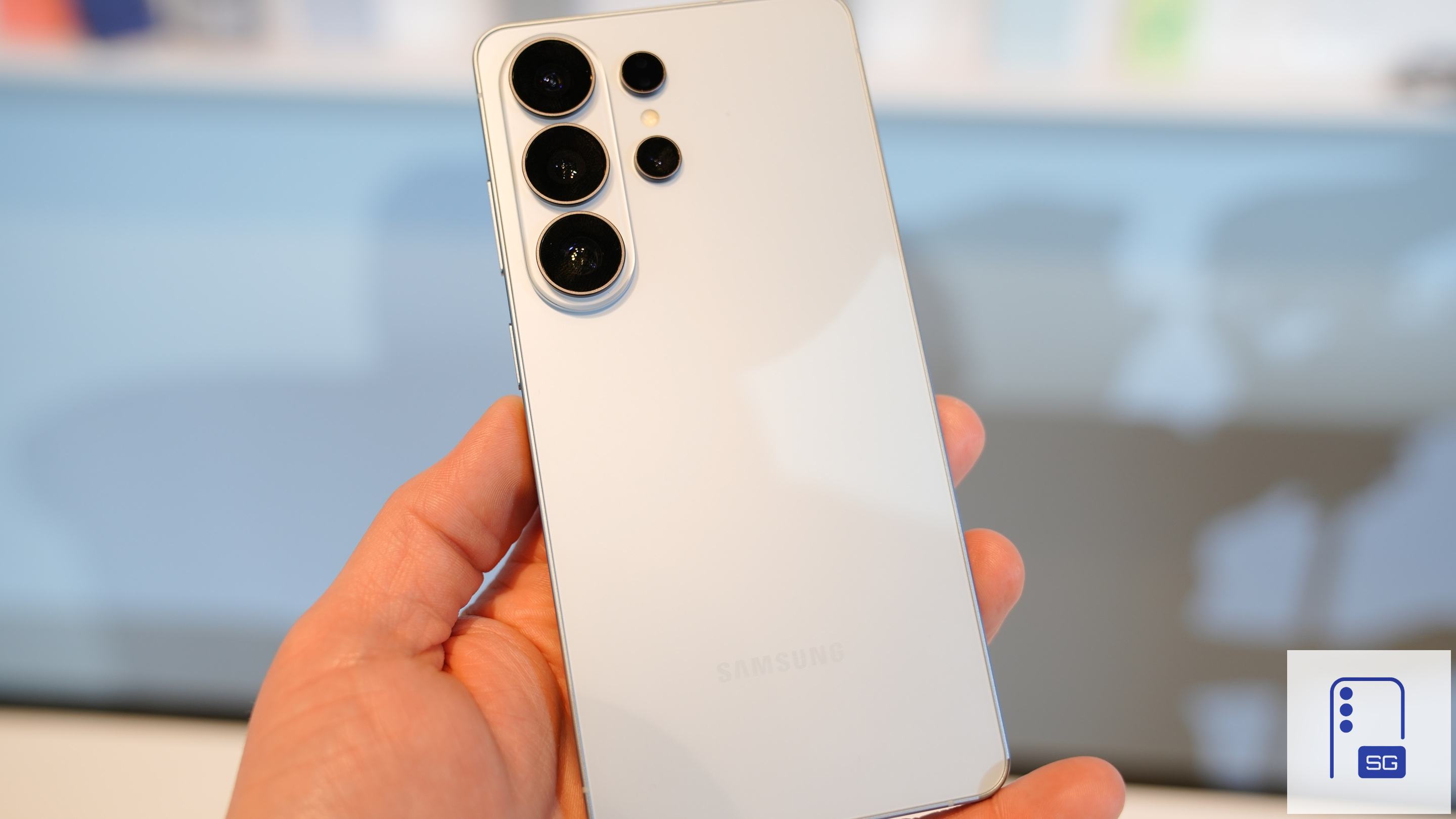
On paper, the Galaxy S26 Ultra is just 0.3mm thinner than its predecessor. In hand, that difference is nearly impossible to detect. What you do feel immediately is the reduced weight.
The phone feels more balanced and less top-heavy. Over longer sessions, especially when using the S Pen or shooting video, the lighter build makes a difference. The side profile remains very similar to the S25 Ultra, so visually it won’t shock anyone. But ergonomically, it’s subtly improved.
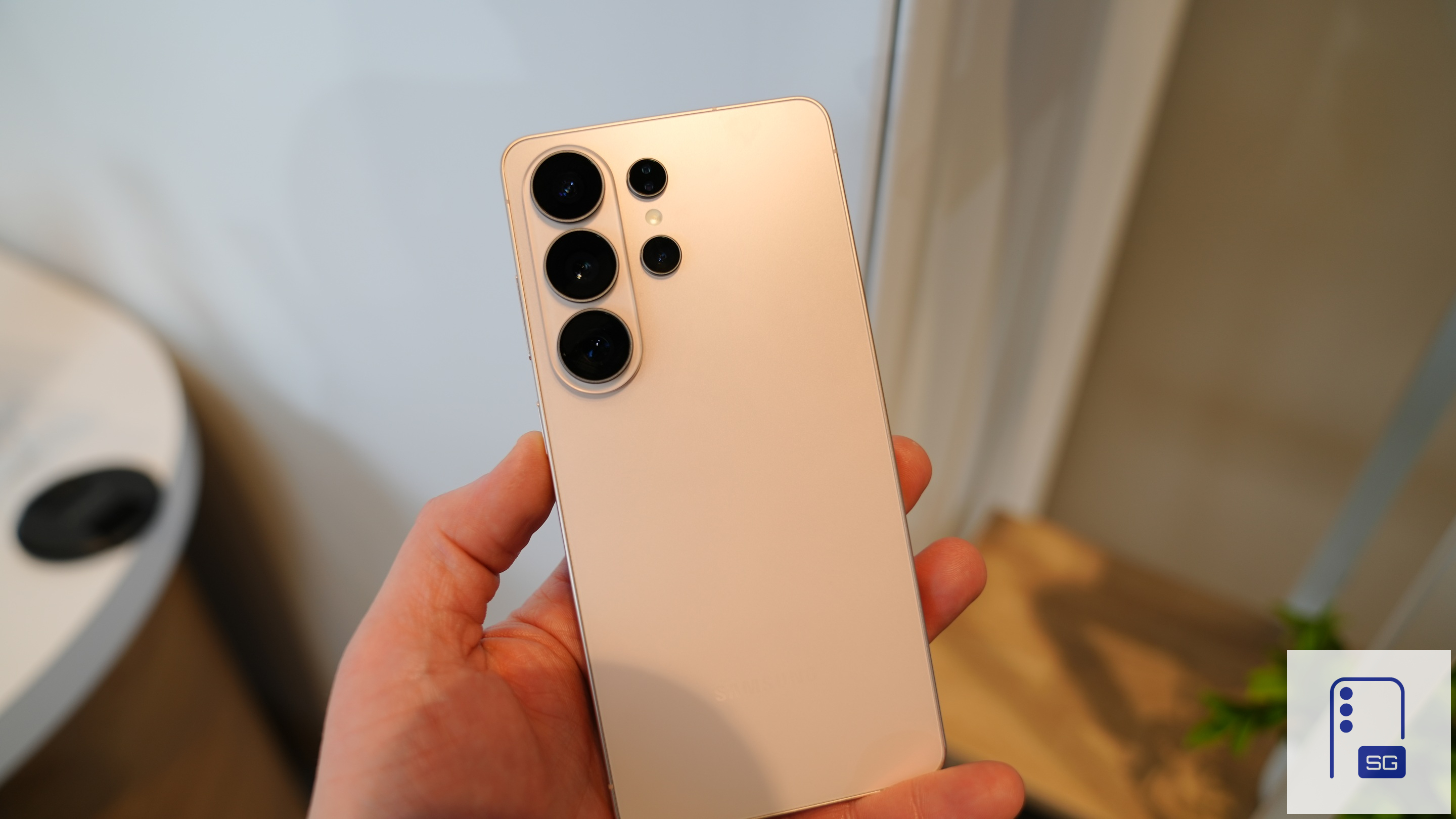
Samsung also redesigned the camera module. The black faux rings around the lenses are gone, replaced with a cleaner, more cohesive design that looks significantly more premium. It finally feels like the camera housing matches the flagship positioning.
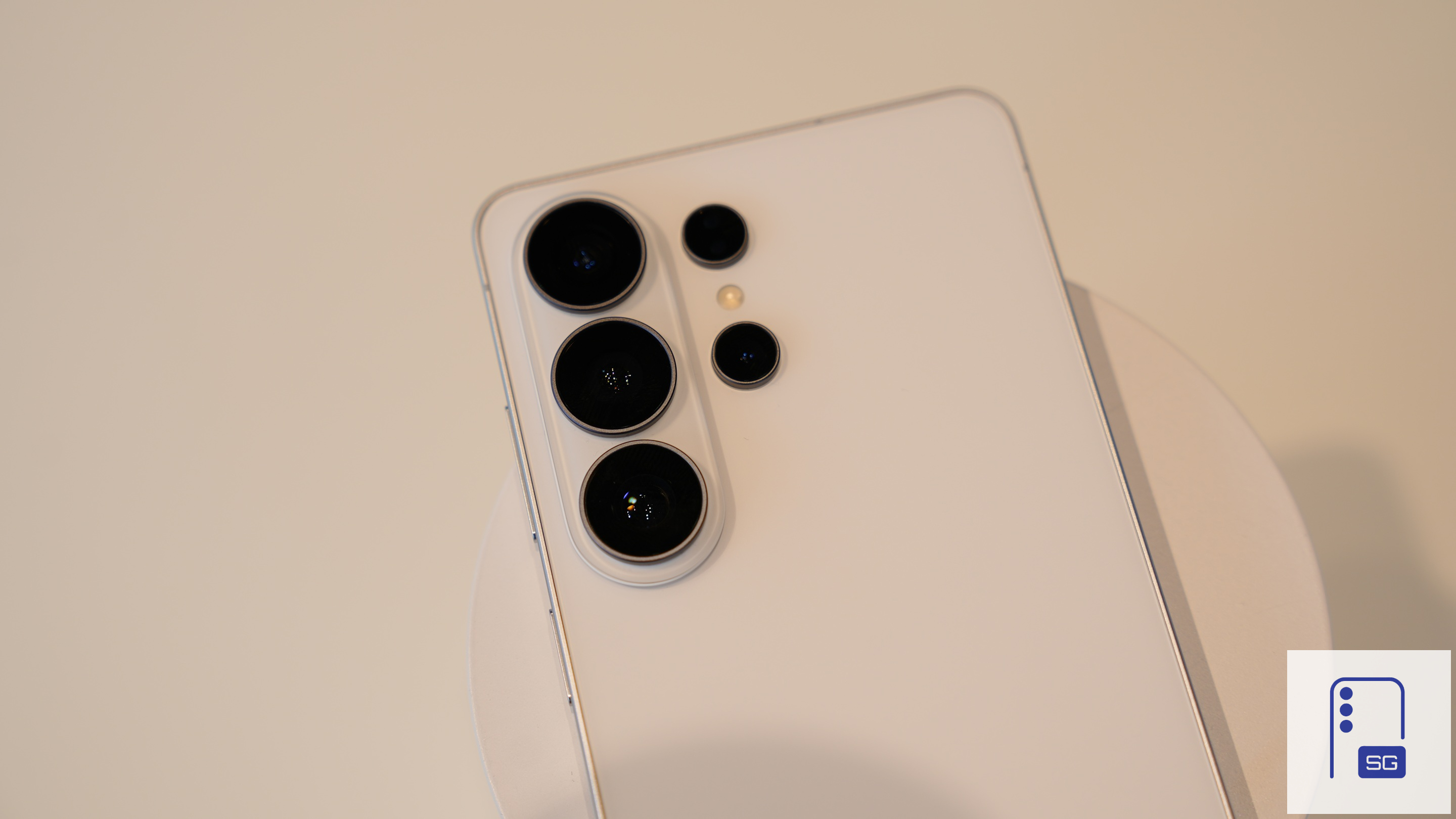
There is one tradeoff: wobble. The new camera module causes noticeable rocking when placed flat on a table without a case, more so than before. Most users will use a case and eliminate the issue, but if you go caseless, it’s something you’ll notice immediately
Galaxy S26 Ultra Colors: Dynamic and Surprisingly Expressive
This year’s color lineup includes:
- Cobalt Violet
- White
- Black
- Sky Blue
- Pink Gold (Samsung.com exclusive)
- Silver Shadow (Samsung.com exclusive)
Cobalt Violet shifts between deep purple and dark blue depending on lighting conditions. Outdoors, it transforms dramatically. Pink Gold moves between a subtle blush tone and a shimmering silver finish in sunlight. It’s elegant and far more dynamic than the name suggests.
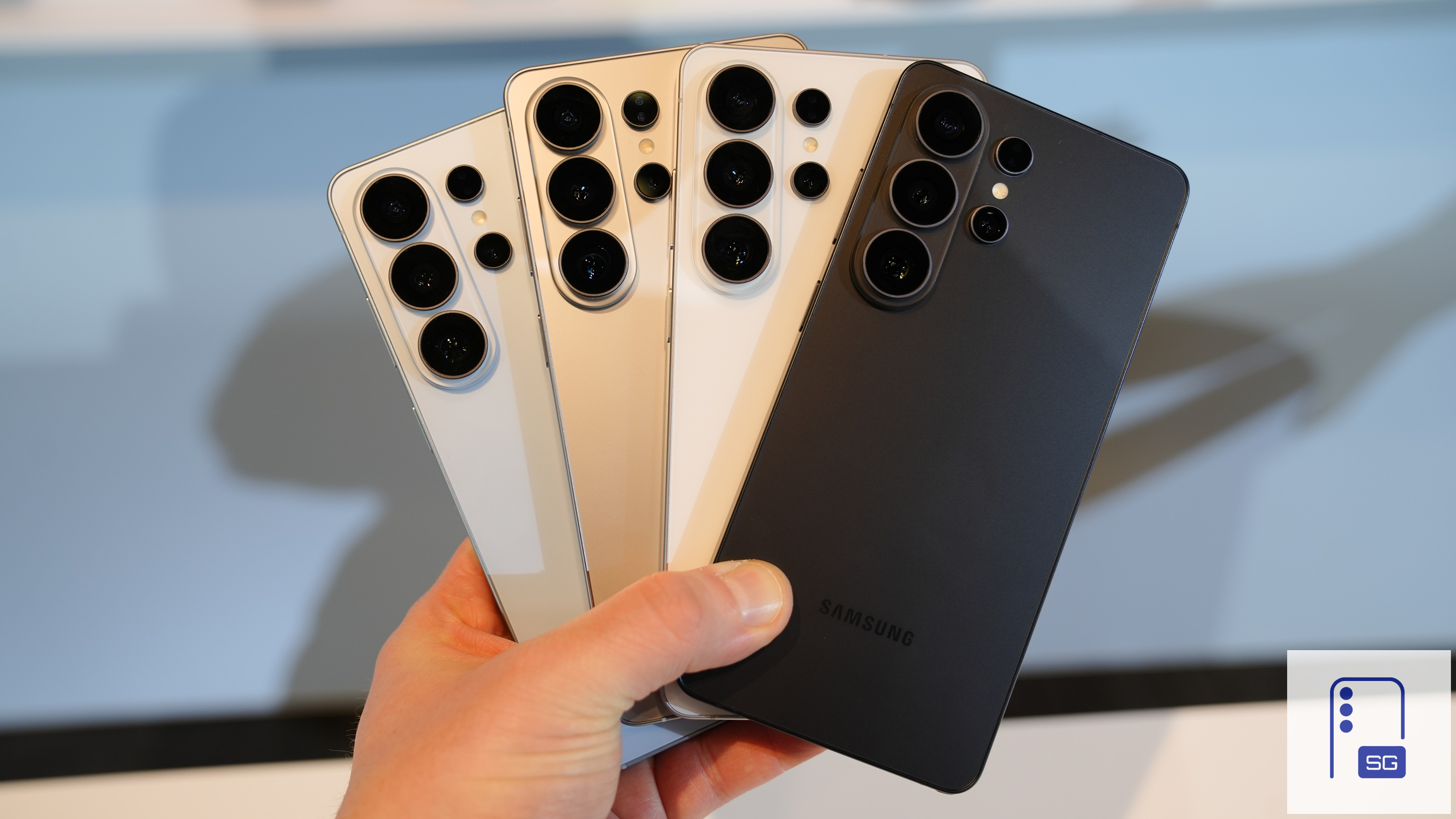
Cobalt Violet is my personal favorite. Pink Gold is the one my wife would choose instantly. I think there is a nice mix of colors, but I would still love to see more saturated hues from Samsung in future launches.
Galaxy S26 Ultra S Pen Changes: Small but Noticeable
The S Pen has been slightly redesigned. It now curves subtly along the bottom edge and side of the device, creating a more integrated look. However, you must insert it in the correct orientation, or it will not fully seat into the device. Even when properly inserted, it doesn’t sit perfectly flush. It doesn’t feel loose, and there’s no indication it will pop out unintentionally, but perfectionists may notice the slight protrusion.
Galaxy S26 Ultra Privacy Display: The Headline Feature
If there is one feature that genuinely surprised me in person, it’s Privacy Display. Samsung has implemented pixel-level viewing angle control that makes the screen virtually unreadable from the side. Unless someone is directly behind you at your exact viewing angle, they won’t see what’s on your display. What’s impressive is that:
- It works in portrait and landscape.
- It does not noticeably degrade color saturation or brightness.
- It can automatically protect PIN entry and passwords.
- You can apply it selectively, such as only to notification content.
- It can be mapped to a double press of the side key.
- It can be triggered automatically via location-based Routines.
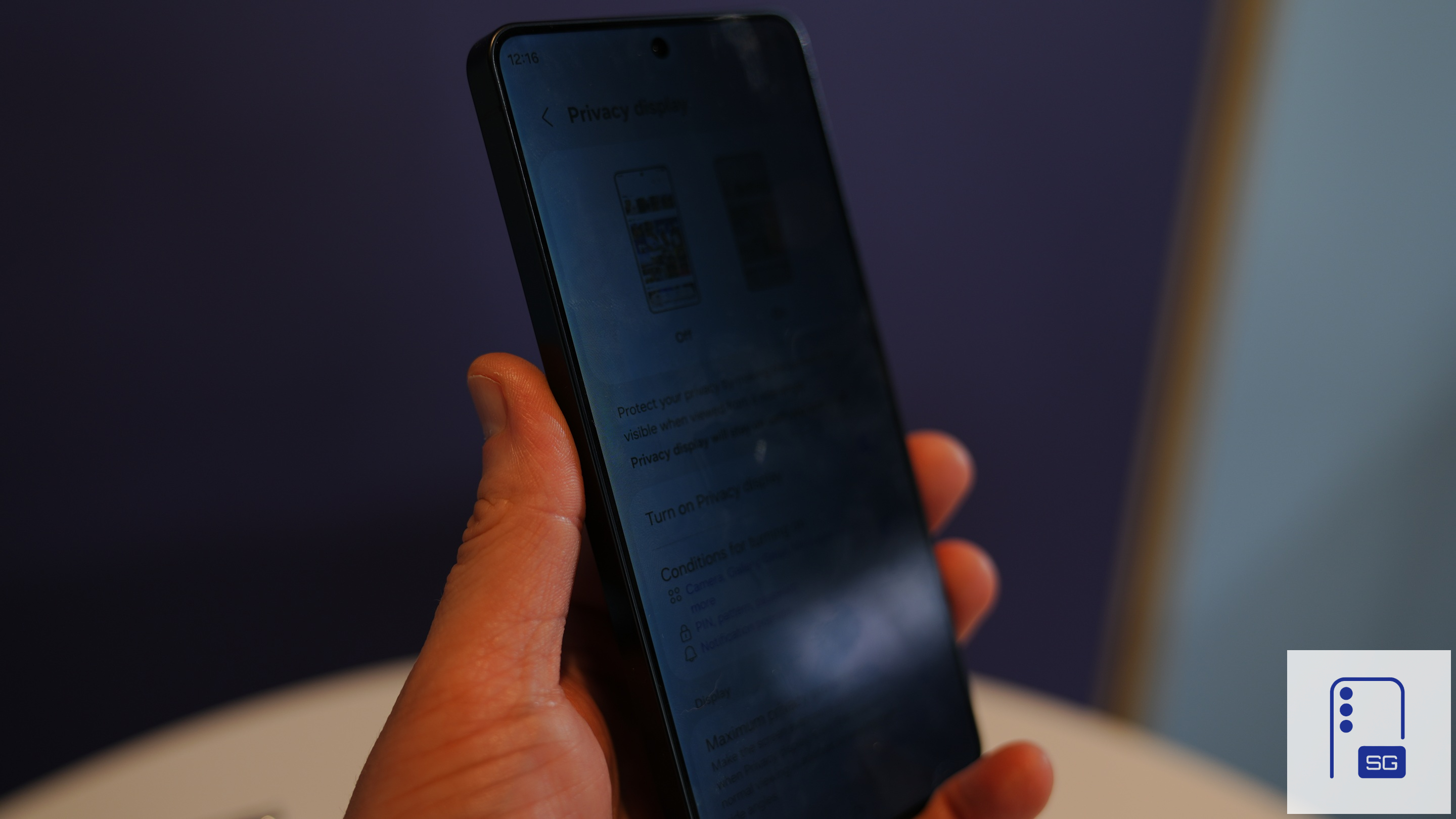
In airports, at conferences, on trains, and in coffee shops, this is a real-world usability win. It’s not a gimmick; it works exactly as advertised.
If you turn on Maximization for Privacy Display, it does slightly reduce contrast and wash out colors a bit, but I wouldn’t call the effect extreme at all. In real-world use, it’s fairly subtle. Plus, most people will likely configure it to apply only to specific parts of the screen or just notifications, rather than the entire display.
It’s also easy to toggle on and off whenever needed, and you can even automate it using location-based routines. Given that flexibility, it really doesn’t feel like a major issue.
Galaxy S26 Ultra Display Upgrades Beyond Privacy
Outside of Privacy Display, the panel itself gets upgrades. Samsung is using a brighter and more vivid M14 display panel paired with Gorilla Armor 2 and the company’s already excellent anti-reflective coating. While Samsung may have wrongly claimed a 10-bit panel, gradients do look smoother and more natural, particularly when viewing high-resolution streaming content. It may be relying on Frame Rate Control (FRC) technology to simulate 10-bit color by rapidly alternating between shades to create the perception of additional color depth.
Samsung also refined ProScaler technology — derived from its TV division — to improve image scaling and clarity. It’s subtle, but in side-by-side demos, enhanced detail retention was noticeable.
Pre-order the Galaxy S26 series through our Mystery Box program to receive a bundle of free gifts. Each box includes 65W GaN charger, USB-C wired earbuds, case, screen protector, desktop stand, cleaning kit, screen protector, and a few extra surprises. Shipping is on us (US only). Fill out this verification form to claim your box. Open the link in Chrome, Samsung Internet, or any web browser (not in the Shop Samsung app) to avoid errors.
Galaxy S26 Ultra Performance and Thermal Improvements
The S26 Ultra runs on the Snapdragon 8 Elite for Galaxy, and Samsung emphasized the deeper customization partnership with Qualcomm this year. Customization now extends to:
- Camera lens processing
- ISP tuning
- Power efficiency optimization
The NPU sees a reported 39% year-over-year improvement, which matters because many of the new Galaxy AI features rely heavily on on-device processing.
Samsung also redesigned the vapor chamber, increasing its size to improve sustained performance and heat dissipation. Despite keeping the 5000mAh battery, Samsung expects real-world battery gains thanks to chip efficiency and thermal improvements.
Galaxy S26 Ultra Charging and Qi2
Wired charging increases to 60W, and wireless charging now supports up to 25W. However, Qi2 magnets are not embedded in the device itself. Samsung says this preserves the slim profile and avoids interference with the S Pen and reverse wireless charging. Instead, all first-party Samsung cases now include integrated Qi2 magnets. It’s a practical compromise, though some users may have preferred built-in magnets.
Galaxy S26 Ultra Camera: Iterative Hardware, Smarter Software
The 200MP main sensor features a wider aperture, allowing more light capture. Samsung also claims meaningful improvements in brightness and low-light performance, particularly in video. But the bigger story is computational.
Nightography video has improved noise recognition across different lenses. The system applies more intelligent noise filtering tailored to ultrawide, telephoto, and main sensors individually. SuperSteady now incorporates real-time gyro and accelerometer data to lock the horizon, even during aggressive motion. It genuinely feels closer to gimbal stabilization, especially with horizontal lock enabled.
Samsung also introduced a new Advanced Professional Video (APV) codec capable of high-quality 8K 30fps capture. For creators who want more flexibility in post-production, that’s a serious addition.
Galaxy S26 Ultra Software and Agentic AI
The most noticeable shift versus previous Ultras isn’t megapixels. It’s software. Audio Eraser now works inside third-party apps like Netflix, YouTube, and Instagram. You can isolate and amplify voices while watching content, not just in your own recordings.
Now Nudges is integrated directly into the Samsung Keyboard and works contextually across apps, suggesting actions like creating calendar events or sharing content based on conversation context.
Now Brief becomes more adaptive by connecting to notifications and anticipating needs based on schedule and location. Screenshot organization now automatically categorizes screenshots into useful groups such as shopping, events, or coupons. Document Scanner is built directly into the camera viewfinder, supporting multi-page scans with automatic finger, shadow, and crease removal. Audio Eraser also supports videos already stored on your device.
On the privacy side, AI-powered call screening analyzes conversations in real time and can transcribe calls on-device. Scam detection monitors patterns during live calls and provides warnings when suspicious language is detected. Bixby also receives large language model enhancements, positioning it more as a device-focused assistant that understands system settings and personalization deeply.
Individually, these features may not all feel revolutionary. Collectively, they move the Ultra line toward a more proactive, agent-driven experience.
Galaxy S26 Ultra – Initial Impressions
The Galaxy S26 Ultra is not a must-upgrade device for S25 Ultra owners unless Privacy Display or faster charging specifically addresses a pain point for you. However, if you’re on an S24 Ultra or older — especially S22 or S23 series — this is a substantial refinement.
The camera hardware evolves modestly, but the display improvements, privacy innovation, AI capabilities, charging upgrades, and refined design create a more polished and forward-looking flagship.
After 90 minutes hands-on, I don’t see this as a spec-sheet revolution. I see it as Samsung meaningfully improving how the phone feels, protects your information, and anticipates your needs. And in daily use, that may matter more than another 10 megapixels.

Written by
Jeff SpringerJeff Springer is the Founder and Managing Editor at SammyGuru. Pursuing his passion for mobile tech, he started covering Samsung and Android on his Youtube channel in 2014 and continues to post daily Samsung tutorial videos. As a past staff writer at XDA Developers and Android Police, Jeff has a wealth of experience managing written content as well. In 2023, Jeff started SammyGuru to offer a different type of Samsung news site. He firmly believes that providing great value to readers is the core mission of our coverage. Jeff lives in Phoenix, AZ with his wife and two kids. In his small amount of free time, he collects fountain pens, stationery, and Pokémon cards.

Follow us on Google Discover & set us as a preferred source in Google News
Share this Post
___________________________


New Blog Posts
___________________________

First Set of Pixel 11 Pro XL Renders Are Here
Pixel 11 Pro XL CAD renders show minimal design changes

Is Samsung Preparing One UI 8.5 Beta for Galaxy Z Fold 5 and Flip 5?
Samsung may launch a One UI 8.5 beta program for its 2023 foldables

Galaxy S25 One UI 8.5 Beta May Run Longer Than Expected
Galaxy S25 series’ One UI 8.5 beta may stretch to 10 rounds







