
Google Calendar Lets You Share and Unsubscribe from Calendars in App
SammyGuru is reader-supported. We have affiliate and sponsored partnerships, so we may earn a commission when you buy through links on our site — at no extra cost to you. Learn more.
If you use the Google Calendar app and rely on the desktop version to share calendars and unsubscribe, we have good news for you. The company is rolling out an update for the app that brings this ability to your Android phone. To check if the update has reached your device, head over to the Google Play Store and search for the app.
New update brings sharing and unsubscribe options to the Google Calendar app
For the uninitiated, the Google Calendar platform lets you stay organized and make the most of your day. For example, you can easily create events, manage multiple calendars, and customize views all in one place. Moreover, it automatically adds events from Gmail, such as light, hotel, concert, and restaurant reservations. You can also access and organize your task lists, keeping your to-dos in one convenient place.
One of the standout features of the platform is the ability to share calendars with family, friends, and colleagues, letting them view, add, or modify events. However, Google didn’t allow users to perform these sharing actions from the app. If you wanted to share a calendar with others, you had to use the desktop version of Google Calendar. Likewise, if you wanted to unsubscribe from a shared calendar with you, you had to go to the web interface.
According to Android Authority, the latest update (version 2025.38.0-809757839) of the Google Calendar app finally brings these sharing and unsubscribing features. This will definitely make managing calendars easier, regardless of platform (mobile or web), especially for users who rely heavily on the app for daily planning.
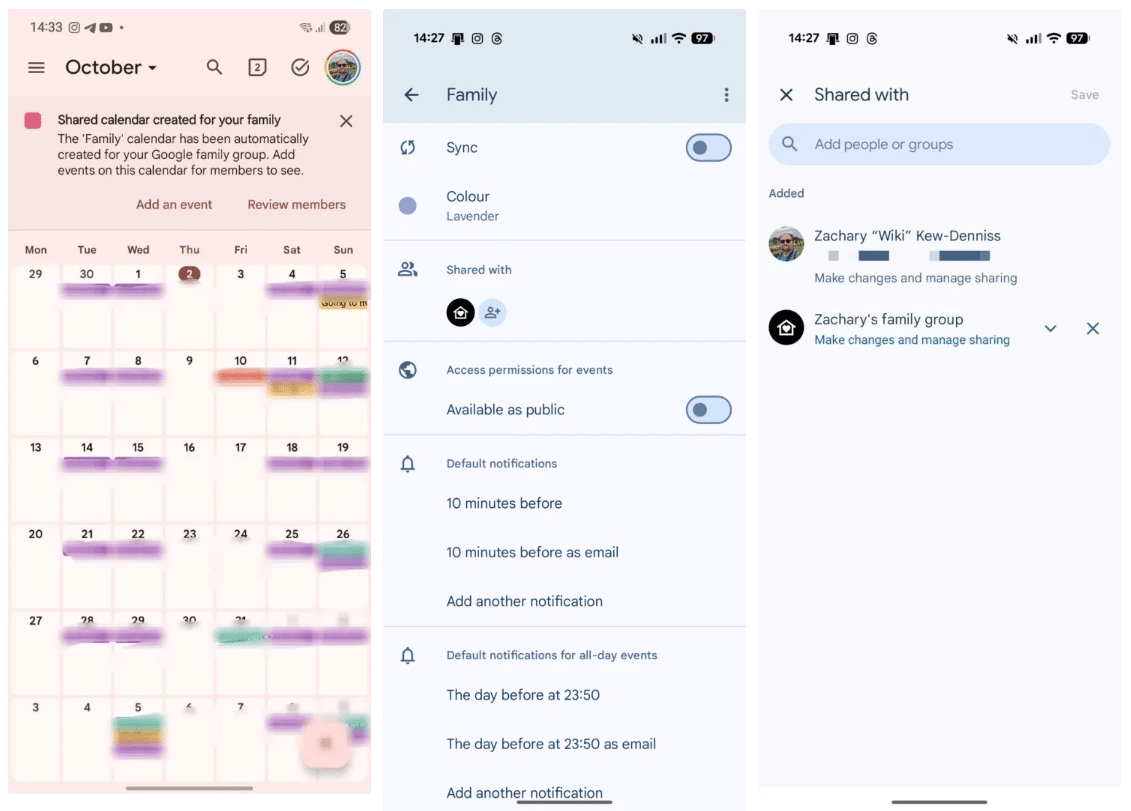
To use the new features in your Calendar app, head over to this route: Menu > Settings. Now, you can tap the calendar you want to manage. You will see a “Shared with” section, where you can add new people or remove them. Similarly, if you want to unsubscribe from a calendar someone has shared with you, you can do this from the settings page.

Written by
Binay KonwarBinay Konwar started his blogging journey in 2014 and has since written plenty of tech articles. At present, he is working as a News Writer at SammyGuru, covering everything about Samsung. He holds a Master's degree in Mathematics, but his real passion lies in tech and writing. In his free time, he enjoys playing chess and watching movies.

Follow us on Google Discover & set us as a preferred source in Google News
Share this Post
___________________________


New Blog Posts
___________________________

First Set of Pixel 11 Pro XL Renders Are Here
Pixel 11 Pro XL CAD renders show minimal design changes

Is Samsung Preparing One UI 8.5 Beta for Galaxy Z Fold 5 and Flip 5?
Samsung may launch a One UI 8.5 beta program for its 2023 foldables

Galaxy S25 One UI 8.5 Beta May Run Longer Than Expected
Galaxy S25 series’ One UI 8.5 beta may stretch to 10 rounds







