
Samsung Brings New Gallery Assistant to One UI 8 Devices
SammyGuru is reader-supported. We have affiliate and sponsored partnerships, so we may earn a commission when you buy through links on our site — at no extra cost to you. Learn more.
Earlier today, Samsung began rolling out the stable One UI 8 (Android 16) update for the Galaxy S25 series. However, there’s even more excitement for Galaxy users, as the company introduced the Gallery Assistant, a new tool within the Gallery app. It is currently available through a beta program for devices running One UI 8.
One UI 8 device users can now experience the new Gallery Assistant tool
Samsung is inviting Galaxy users to try out the Gallery Assistant before its official release. The eligible devices for the beta program include the Galaxy S25 series, Z Flip 7, Z Fold 7, and Z Flip 7 FE. As of now, the program is live in the company’s home country, South Korea, but it may expand to other regions in the coming weeks.
The latest Gallery Assistant is a new batch editing tool within the Gallery app. However, for users who want more options while retaining the convenience of Gallery, the company is preparing a separate app. This new tool offers a bunch of practical features to make managing photos and videos easier. Thanks to @KeepUPwithOneUI for sharing a screenshot of the new Assistant with us; we now get our first glimpse of its features.
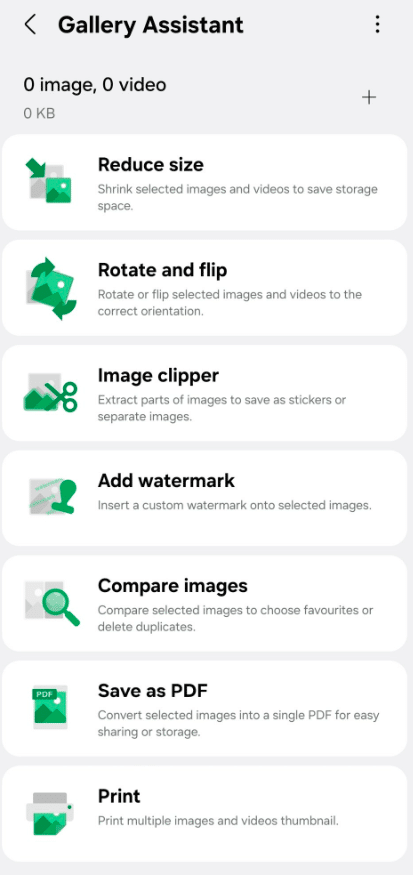
With Gallery Assistant, you can shrink selected images and videos from your Gallery to save storage space. It lets you rotate or flip media to ensure the correct orientation. Thanks to Image Clipper, you can extract parts of images and save them as stickers or separate files.
Furthermore, you can add custom watermarks to selected images and compare multiple images to choose favorites or delete duplicates. Another notable feature is the ability to save selected images as a single PDF. The tool also lets you print multiple images and video thumbnails directly from your device.
Eligible Galaxy users who want to try out these new features first need to launch the Samsung Members app. From there, tap the Gallery Assistant beta banner to join the program. We’ll be sure to let you know when the company makes it widely available.

Written by
Binay KonwarBinay Konwar started his blogging journey in 2014 and has since written plenty of tech articles. At present, he is working as a News Writer at SammyGuru, covering everything about Samsung. He holds a Master's degree in Mathematics, but his real passion lies in tech and writing. In his free time, he enjoys playing chess and watching movies.

Follow us on Google Discover & set us as a preferred source in Google News
Share this Post
___________________________


New Blog Posts
___________________________

First Set of Pixel 11 Pro XL Renders Are Here
Pixel 11 Pro XL CAD renders show minimal design changes

Is Samsung Preparing One UI 8.5 Beta for Galaxy Z Fold 5 and Flip 5?
Samsung may launch a One UI 8.5 beta program for its 2023 foldables

Galaxy S25 One UI 8.5 Beta May Run Longer Than Expected
Galaxy S25 series’ One UI 8.5 beta may stretch to 10 rounds







